Auto-Sleep idle tabs
Tabs you have not touched for 30 minutes go to sleep and give their memory back. Click one and it loads again. The tab you are on, pinned tabs and protected sites never sleep.
 CleanerAdd to Chrome
For when one site breaks
A Chrome extension that clears cache and cookies for just the site you are on. It shows what the site stored, clears it in one click, reloads the page and tells you what it removed. Mail, bank and work stay signed in.
ERR_TOO_MANY_REDIRECTS
shop.example.com redirected you too many times.
Checkout
Signed in as you · 2 items
Pay nowCleanershop.example.com
Removed 34 cookies + 12.3 MBPage reloaded fresh.
The real reason Chrome feels slow
Every open tab can keep a whole page loaded in memory, and forty of them add up. Cleaner Pro puts the idle ones to sleep and clears the clutter for you, so Chrome stays quick without you thinking about it.

Typing lags, videos stutter, switching tabs takes a second. It feels like the laptop got old overnight.
An open tab can keep its whole page loaded in memory, even one you have not looked at for days.
Docs, dashboards, search results. You open it again because you cannot find the tab you already have.
Wiping the cache rarely speeds Chrome up. It just signs you out of every site, and the slowness is still there.

Tabs you have not touched for 30 minutes go to sleep and give their memory back. Click one and it loads again. The tab you are on, pinned tabs and protected sites never sleep.
Cleaner finds tabs open on the same page and closes the extra copies, keeping one of each.
The Tab Manager side panel sorts your open tabs by estimated memory, so the heavy ones are at the top.
Old cache is cleared in the background every few hours, without signing you out of anything.
One payment, up to 3 browsers, no subscription. Illustrations, not screenshots.
One clean, start to finish
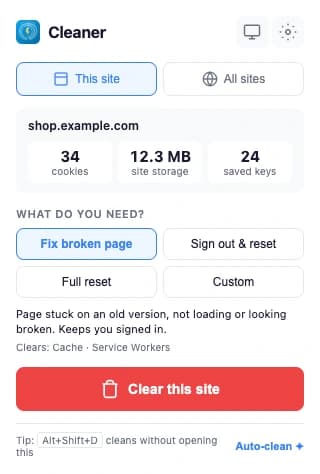
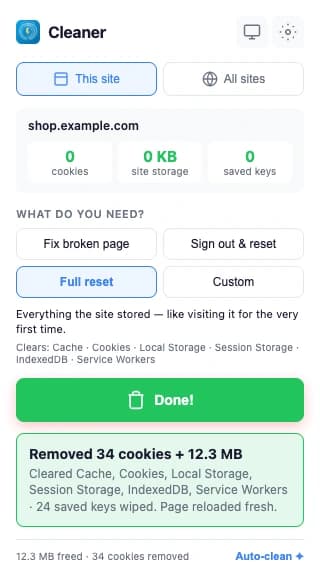
The actual extension on a test shop: 34 cookies and 12.3 MB before, a receipt and zeros after. Nothing else in the browser changed.
Sound familiar?
You enter your password, it redirects, and you are on the login page again. One stale cookie on one site is usually the cause.
The fix is live and your team sees it. You don’t, because the browser serves a cached copy and a normal reload does not help.
A broken cookie bounces the page in a circle. Clearing that one site’s cookies breaks the circle.
Chrome’s button wipes every site at once. Mail, bank, work tools: all signed out, to fix one page.
How it works
Click the Cleaner icon on the site that is stuck, looping or showing an old version. You see what it stored: cookies, storage size and saved keys.
Fix broken page keeps you signed in. Sign out & reset breaks a login loop. Full reset makes it feel like your first visit. Or choose Custom.
One click clears that site only, reloads the page and shows what was removed. Every other site stays signed in.
Keeps you signed in
ClearsCache · Service workers
Use it forOld version, broken layout, page not loading
Signs out of this site only
ClearsCookies · Cache · Site storage
Use it forLogin loop, too many redirects, wrong account
Like a first visit
ClearsCache · Cookies · Local and session storage · IndexedDB · Cache Storage · Service workers
Use it forTesting, or a site that is totally stuck
You choose
ClearsAny mix of data types and a time range
Use it forWhen you know exactly what to clear
What it does
Open the popup on any site and you get three numbers: cookies, site storage and saved keys. You know what is there before anything is deleted.
One click clears the site, hard-reloads the page and shows what it removed: “Removed 34 cookies + 12.3 MB”. The counts drop to zero in front of you.
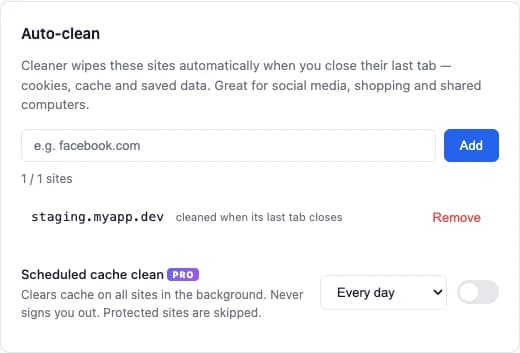
Pick the sites you never want to keep data from: a shop full of trackers, a test server, a shared login. Close the tab and they are wiped. Free auto-cleans 1 site, Pro has no limit.
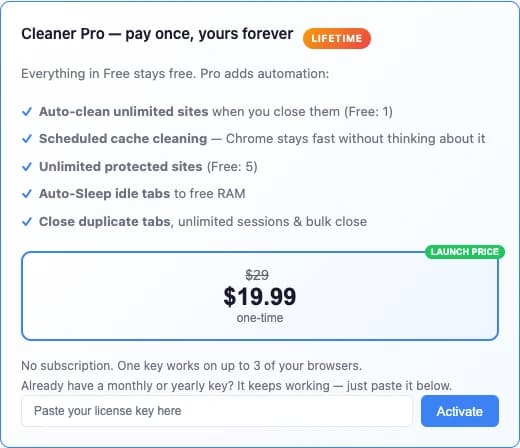
Pro is a single payment through Lemon Squeezy, with a license key you paste into Settings. No subscription and no account with us.
Also inside: a Tab Manager side panel that sorts open tabs by estimated memory, name or recent use, and saves a group of tabs as a session.
Chrome’s button vs Cleaner
| What you get | Clear browsing data | Cleaner |
|---|---|---|
| Clears only the site you are on | Every site at once | ✓ |
| Keeps you signed in everywhere else | — | ✓ |
| Shows what the site stored first | — | ✓ |
| Receipt of what was removed | — | ✓ |
| Sites it never touches | — | 5 free · unlimited Pro |
| Auto-clean when a tab closes | — | 1 site free · unlimited Pro |
| Keyboard shortcut | Opens Settings | Alt+Shift+D cleans now |
Privacy
Everything runs inside your browser. Cleaner has no backend, no tracking, no ads, and keeps no history of the sites you clean.
It counts cookies and measures storage so it can show you numbers. Cookie values and page content are never read out or sent anywhere.
So it can measure and clear whichever site you are on, localhost and staging included, and auto-clean in the background. It cannot know your sites in advance.
If you enter a Pro key, it is checked with the Lemon Squeezy License API. Without a key, the extension makes no network requests.
Pricing
Clearing cache, cookies and every other data type is free forever, with no time limit. Pro only adds automation.
$0
Forever. No account.
Add to Chrome$19.99 once
Launch price, then $29. Up to 3 browsers. No subscription.
Get Pro for $19.99| Feature | Free | Pro |
|---|---|---|
| Clear this site or all sites, every data type, every time range | ✓ | ✓ |
| 3 one-click fixes + Custom | ✓ | ✓ |
| Keyboard shortcut + auto-reload | ✓ | ✓ |
| Protected sites | 5 | Unlimited |
| Auto-clean when the last tab closes | 1 site | Unlimited |
| Scheduled cache cleaning | — | ✓ |
| Tab Manager: saved sessions | 1 | Unlimited |
| Tab Manager: close tabs at once | 3 | Unlimited |
| Auto-Sleep idle tabs, close duplicates | — | ✓ |
Already on a monthly or yearly plan? Your key keeps working until it expires.

New fixes, new guides for broken Chrome sites, and Pro deals. A few emails a year, unsubscribe in one click.
No spam. Unsubscribe anytime.
Follow along
Good to know
Not unless you ask it to. Fix broken page keeps your cookies, so you stay signed in. Only Sign out & reset, Full reset or a Custom choice with cookies removes logins, and only for the current site. Clearing cookies on all sites asks you to confirm first.
No. Clearing cache, cookies and every other data type, on the current site or on all sites, is free, with no time limit and no account. Pro only adds automation.
Chrome's tool clears every site at once and sits several clicks deep in Settings. Cleaner targets only the site you are on, keeps your other logins, protects the sites you choose and shows you what it actually removed.
To measure and clear data for whichever site you are on, and to auto-clean sites in the background. It cannot know in advance which site you will want to clean. It never reads page content and never sends your browsing anywhere.
No. Pro is a one-time payment of $19.99 that works on up to 3 of your browsers. If you were on the old monthly or yearly plan, your key keeps working until it expires.
Chrome does not let extensions clear its own internal pages, so open a normal website first. Chrome on Android and iPhone does not run extensions, so Cleaner is for Chrome on Mac, Windows, Linux and ChromeOS.
Free on Chrome for Mac, Windows, Linux and ChromeOS.
Add to Chrome, it’s free