Chrome extensions · 12 on the shelf
Small extensions that fix one annoying thing.
Each one does a single job in your browser and gets out of the way. No account to start, no tracking, and when there is a Pro version you pay for it once.

Find a fix
What is bugging you today?
- A site is broken, but clearing Chrome would log you out of everything
 Cleaner
- English slows you down every time you reply on X
 AI Reply for X
- You are about to share your screen and your inbox is open
 Privacy Blur
- A white page lights up the room at 11 PM
 DarkMode Pro
- You need to circle the bug, not describe it
 Draw & Highlight
- Your 2FA codes are on a phone across the room
 2FA Authenticator
- Forty tabs open and you cannot find the one you need
 Tab Manager
- You paste the same prompts into ChatGPT one by one
 Auto Chat & PDF Export
- You need forty images from one page, not forty right-clicks
 Image Downloader
- Your video screenshot is half play bar and buttons
 Screenshot YouTube+
- Six API calls hide in 200 rows of the Network tab
 Network View
Cleaner · on the Chrome Web Store
Fix one site. Stay logged in everywhere else.
Chrome’s Clear browsing data wipes every site to fix one. Cleaner clears only the site that is stuck, then shows you exactly what it removed.
- Clears only the site you are on, not your whole browser
- A receipt after every clean: “Removed 34 cookies + 12.3 MB”
- Every clean is free. Pro adds auto-clean, $19.99 once
Featured on the Chrome Web Store · Rated 5.0

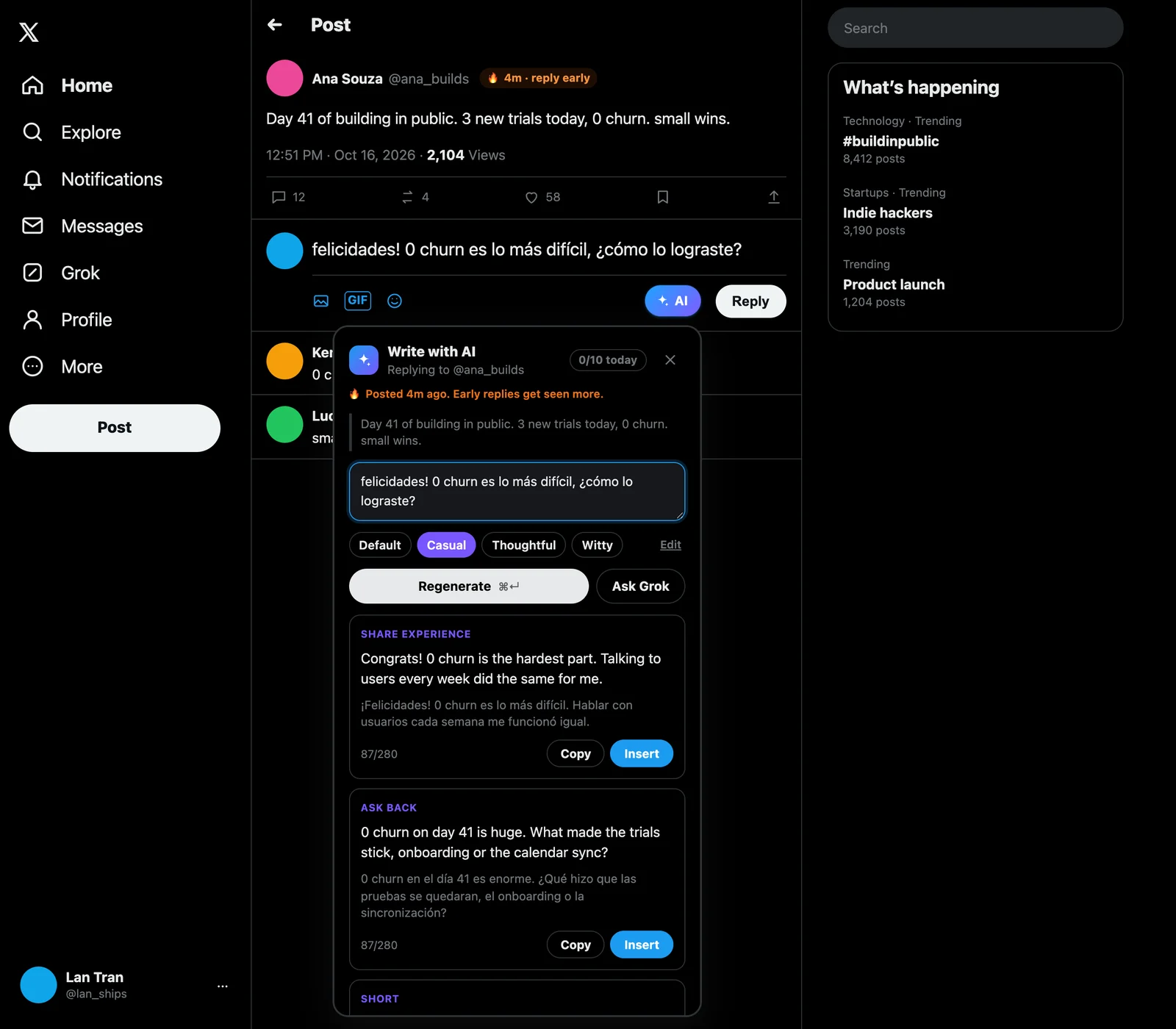
AI Reply for X · coming soon
Write in your language. Reply in natural English.
For people who build in public on X when English is not their first language. Press the AI button next to Reply and get 3 English drafts in your own voice, each with a translation line so you know what you are about to post.
- Runs on your own free Gemini key, no monthly bill from us
- Never posts for you. You pick a draft, you press Post
- Pro is a one-time payment: more styles and Clone my voice
Get one email when it is on the Chrome Web Store.
No spam. Unsubscribe anytime.
The shelf
All 12 extensions
How we build them
Four rules every extension follows
- 01
One job each
Every extension fixes one annoyance and stays out of the way the rest of the time. No dashboards, no feeds.
- 02
No account to start
Install it and it works. No sign-up wall, no email gate in front of the button you came for.
- 03
No tracking
An extension that fixes one thing has no reason to watch what you browse, so ours do not.
- 04
Pay once, if at all
The core job is free. When there is a Pro version, it is a one-time payment, not a subscription.
Fix Chrome
Guides for when Chrome misbehaves
- Chrome Incognito Keeps Asking for a Captcha? Why Google Says Unusual TrafficChrome Incognito keeps asking for a captcha and says unusual traffic from your network? See what Google actually checks, the 2-minute test, and what fixes it.
- Why Does Chrome Keep Logging Me Out? 8 Causes and the Fix for EachWhy does Chrome keep logging me out of websites every time I close it? Check these 8 causes, from one cookie setting to cleanup apps, and fix each one.
- Chrome Sync Paused Every Time You Close It? Why, and the Fix That SticksChrome sync paused every time you close the browser? Learn what Paused means, the one setting that usually causes it, and how to keep Google signed in.
- Chrome Using Too Much Memory? Why It Happens and 7 Fixes That WorkChrome using too much memory? See which tab or extension holds the RAM, then cut it with Memory Saver, sleeping idle tabs and fewer duplicate tabs.
Questions
Before you install
Are these extensions free?
Yes, every extension here does its main job for free. Cleaner and AI Reply for X have an optional Pro version that you pay for once (Cleaner Pro is $19.99 at launch and works on up to 3 browsers). There are no subscriptions.
Do I need an account?
No. You install from the Chrome Web Store and start using it. Pro, when you want it, is a license key you paste into the extension’s settings.
Do the extensions track what I browse?
No. They do their one job and do not report what you browse. Cleaner, for example, only counts a site’s cookies, it never reads them, and AI Reply for X sends nothing but the post you reply to and your own words to Google’s Gemini, using your key.
Which browsers do they work in?
Chrome on Mac, Windows, Linux and ChromeOS. Chrome on Android and iPhone does not run extensions. Most Chromium browsers that install from the Chrome Web Store, such as Brave and Edge, can install them too.
Something is not working. Who do I ask?
Write to us from the contact page and name the extension. Every message is read by the person who built it.
One email when a new extension ships.
A few times a year, never more. Unsubscribe in one click.
No spam. Unsubscribe anytime.