You type a reply, then delete it
You know what you want to say. You are just not sure the English is right, so you scroll on and the conversation moves without you.
For non-native speakers who build in public on X
A Chrome extension that puts an AI button next to Reply on x.com. Type what you mean in Spanish, Portuguese, Hindi or anything else, and get 3 English replies in your own voice, each with a translation line so you know exactly what you are posting.
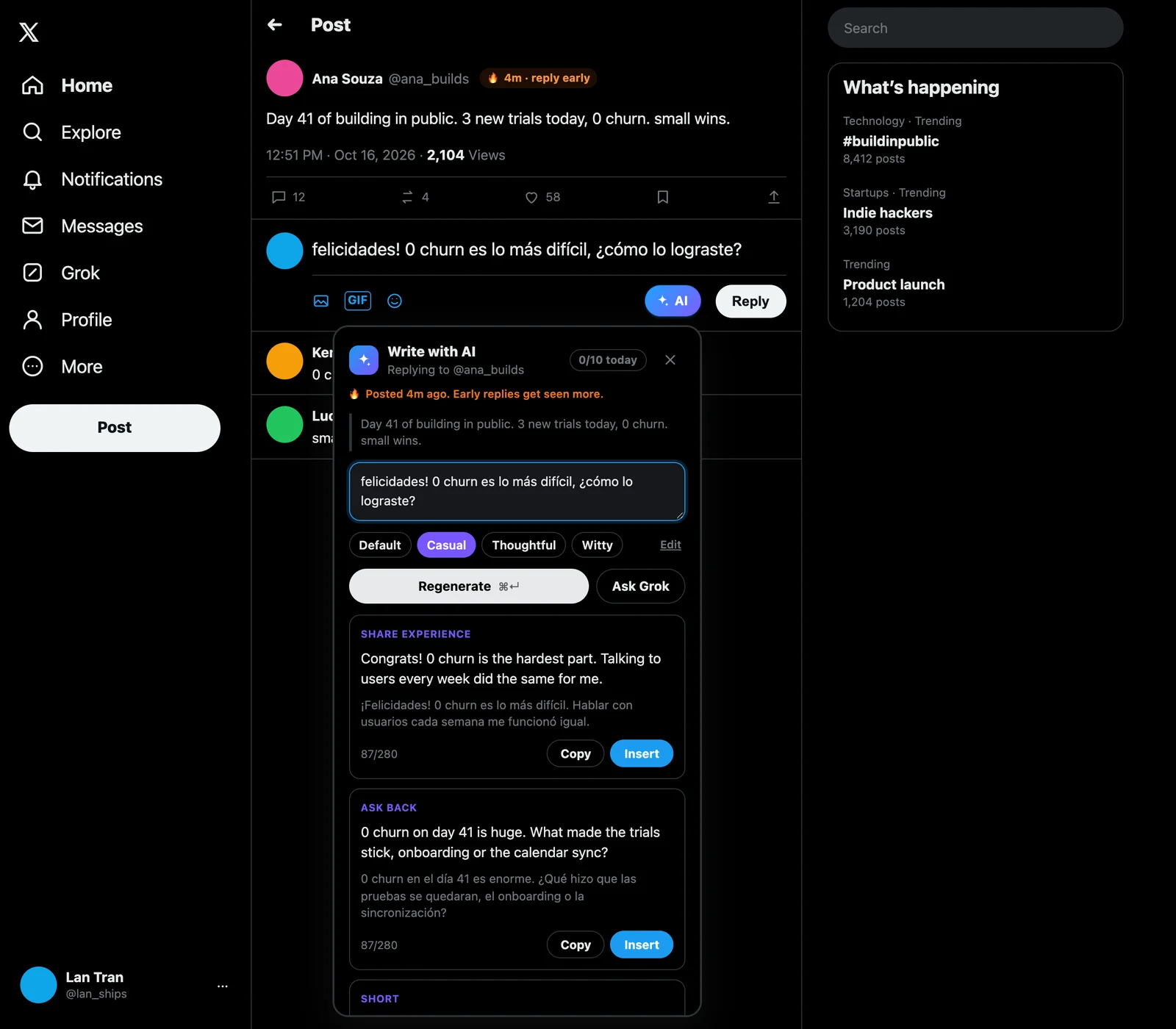
🔥 Posted 4m ago. Early replies get seen more.
Day 41 of building in public. 3 new trials today, 0 churn. small wins.
SHARE EXPERIENCE
Congrats! 0 churn is the hardest part. Talking to users every week did the same for me.
¡Felicidades! 0 churn es lo más difícil. Hablar con usuarios cada semana me funcionó igual.
ASK BACK
0 churn on day 41 is huge. What made the trials stick, onboarding or the calendar sync?
0 churn en el día 41 es enorme. ¿Qué hizo que las pruebas se quedaran, el onboarding o la sincronización?
Right inside x.com
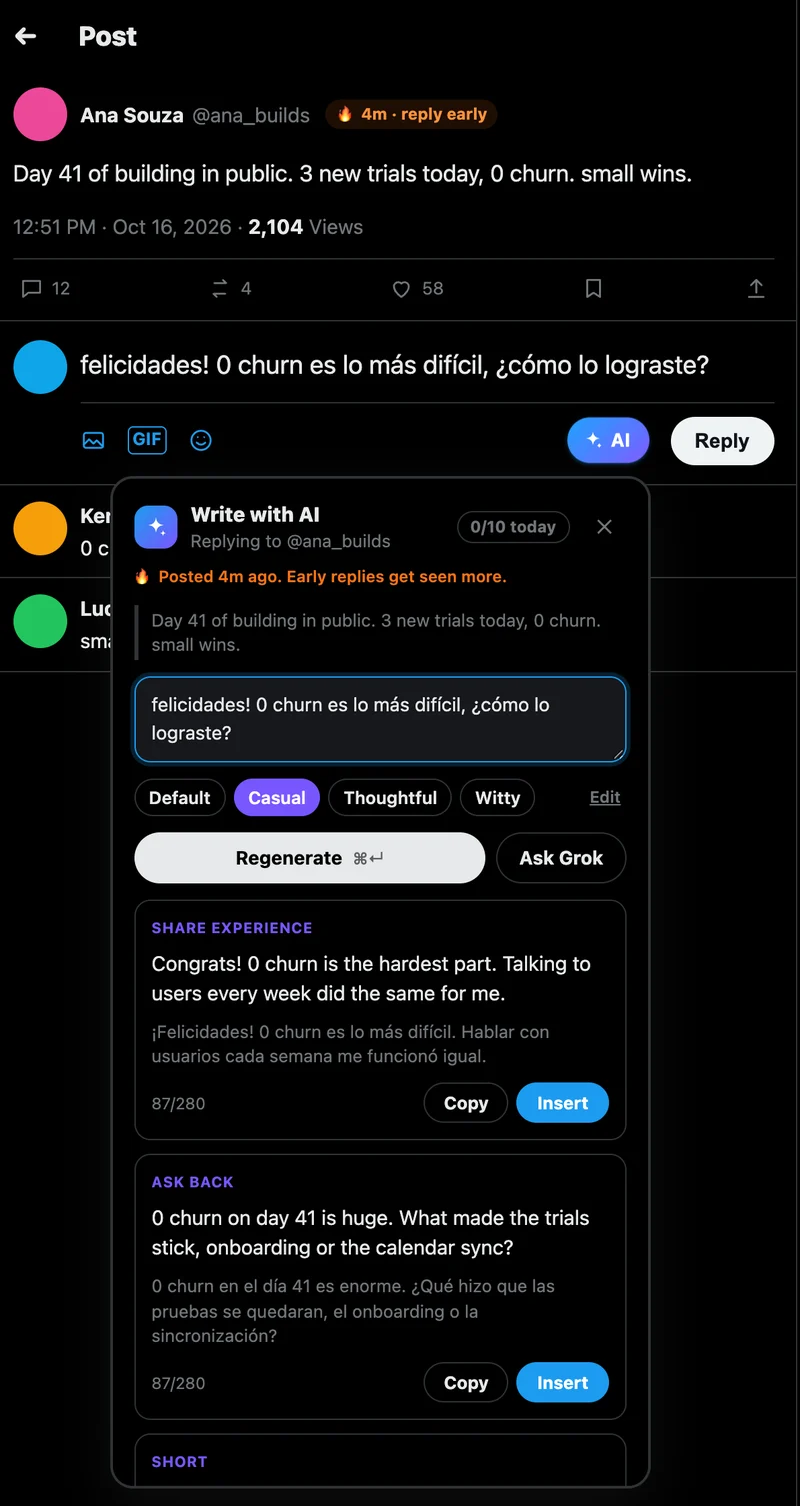
The real extension on a post page: the idea typed in Spanish, three English drafts with the Spanish line under each, and a radar badge on a post that is 4 minutes old. Accounts are made up for this picture.
One reply, start to finish
Ana Souza @ana_builds · 4m
Day 41 of building in public. 3 new trials today, 0 churn. small wins.
It shows up on every reply box and every new post on x.com.
Type the idea in your own language, or leave it empty and let it read the post.
SHORT
Small wins compound. Congrats on 0 churn!
Las pequeñas victorias suman. ¡Felicidades por el 0 churn!
Read the translation line, insert the draft, edit if you like, post it yourself.
Sound familiar?
You know what you want to say. You are just not sure the English is right, so you scroll on and the conversation moves without you.
Replies that open with “Great post!” get skipped. People can tell, and your account starts to look automated.
X to ChatGPT, ChatGPT to a translator, back to X. Minutes for one reply, and by then the post is old news.
The draft looks fine, but one word could mean something you did not intend. You hit Post and hope.
Set up once
Get a free API key from Google AI Studio and paste it into the welcome screen. Tell it a little about you and pick the language for the translation line.
On any reply or new post on x.com there is an AI button. It reads the post you are replying to, and anything you typed in your own language.
You get 3 English drafts, each with a translation line underneath. Insert the one you like, edit if you want, and post it yourself.
What it does
The AI button sits next to Reply on every post. It reads the post and anything you typed, in any language, and writes three different English replies: share an experience, ask back, keep it short.
🔥 Posted 4m ago. Early replies get seen more.
Day 41 of building in public. 3 new trials today, 0 churn. small wins.
SHARE EXPERIENCE
Congrats! 0 churn is the hardest part. Talking to users every week did the same for me.
¡Felicidades! 0 churn es lo más difícil. Hablar con usuarios cada semana me funcionó igual.
ASK BACK
0 churn on day 41 is huge. What made the trials stick, onboarding or the calendar sync?
0 churn en el día 41 es enorme. ¿Qué hizo que las pruebas se quedaran, el onboarding o la sincronización?
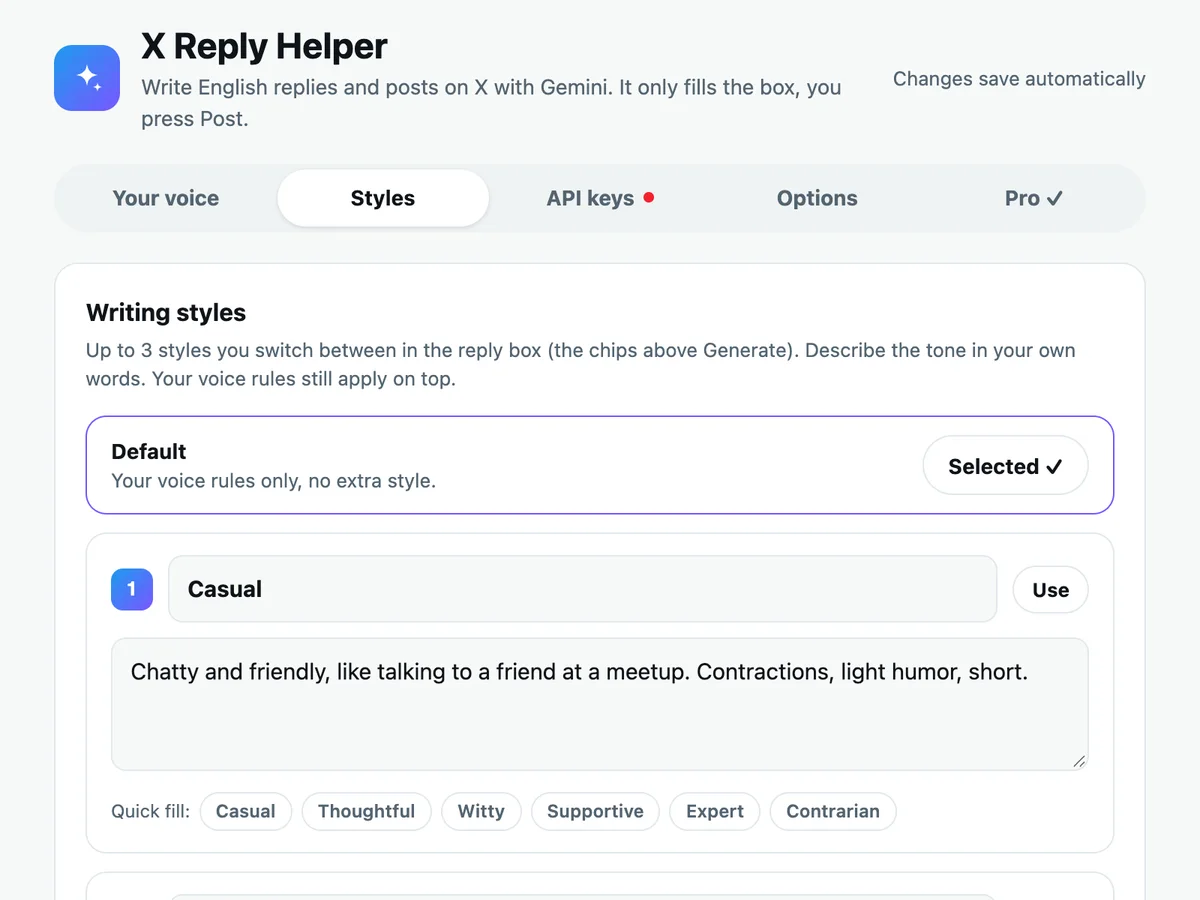
Casual with friends, thoughtful with founders, witty for fun. Describe each style in your own words, then switch with the chips above Generate. Free keeps Default plus one style.
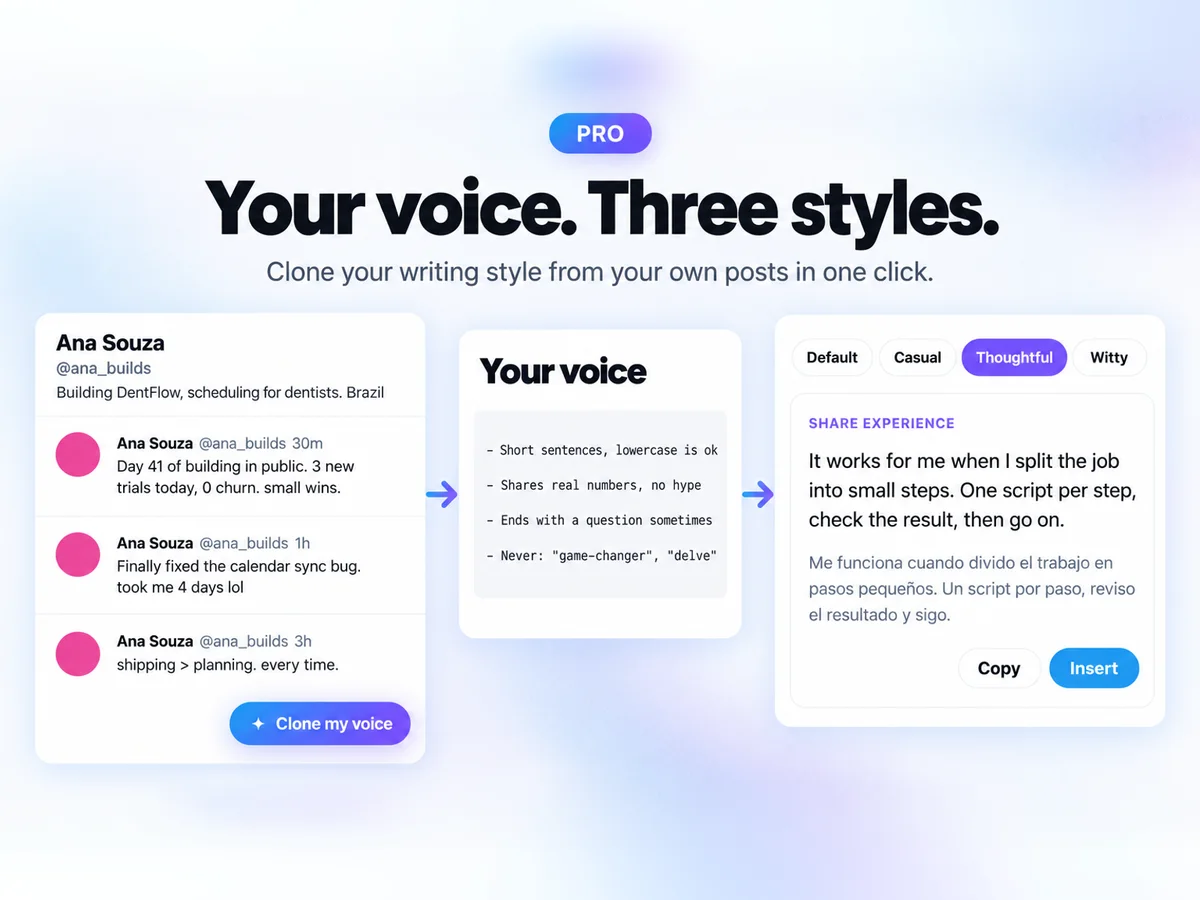
Open your own profile and press Clone my voice. The extension reads your recent posts and writes your voice rules for you: sentence length, capitals, emoji, the words you never use. Undo if you don’t like it.
Add the accounts you care about. Fresh posts from them, under 30 minutes old, get a small badge right in your timeline, so you reply early instead of an hour late.
Ana Souza @ana_builds · 4m🔥 4m · reply early
Day 41 of building in public. 3 new trials today, 0 churn. small wins.
Kenji Mori @kenji_ships · 2h
what are you building this weekend?
Lucía Ramos @lucia_makes · 12m🔥 12m · reply early
Shipped the new pricing page. Signups are up, but churn worries me.
Safe for your account
No auto-replies, no auto-likes, no scheduling. The extension only fills the box; you post like always.
Your Gemini key lives in your own Chrome sync storage and is only sent to Google’s Gemini API. No account with us, no analytics.
It runs on x.com and twitter.com, nowhere else, and the only browser permission it asks for is storage.
Nothing is added to your replies. Nobody can tell you used a helper unless you tell them.
Pricing
No subscription: it runs on your free Gemini key, so there is no monthly AI bill to pass on to you.
$0
Forever. Bring your free Gemini key.
Get notified$29 once
Launch price $19 for the first 100 buyers. Up to 3 browsers.
Get the launch price| Feature | Free | Pro |
|---|---|---|
| 3 drafts, any language in, English out | ✓ | ✓ |
| Translation line under each draft | ✓ | ✓ |
| Voice rules, focus mode, daily goal | ✓ | ✓ |
| Writing styles | Default + 1 | Default + 3 |
| Clone my voice | — | ✓ |
| Reply Radar | — | ✓ |
| Browsers per license | — | Up to 3 |
That email has the install link and the $19 launch price for Pro. Nothing else.
No spam. Unsubscribe anytime.
Good to know
The extension never posts, likes or replies for you. It only fills the reply box, and you press Post yourself, the same as typing. Your voice rules and a built-in list of banned AI phrases keep drafts from sounding like generic AI.
No. It runs on your own Gemini API key, which Google gives out for free in AI Studio. There is no monthly bill from us. On the free Gemini tier Google may use what you send to improve its models, so the extension only sends the public post and the idea you typed.
Your keys are saved in Chrome sync storage on your own account. The Gemini key is only sent to Google's Gemini API. A Pro license key is only sent to Lemon Squeezy to check it. There is no account with us and no analytics in the extension.
Type in any language Gemini understands, or in broken English. The translation line under each draft can be set to 20 languages, or one you type in. The drafts themselves are in English.
Free does the whole job: 3 drafts, any language in, the translation line, Insert, voice rules, focus mode, a daily goal and one writing style. Pro is a one-time payment that adds three styles, Clone my voice and Reply Radar. One license works on up to 3 browsers.
AI Reply for X is getting ready for the Chrome Web Store. Leave your email and we send one message when it is live.
Free on Chrome, with your own Gemini key. You press Post.
Tell me when it launches