The Dock is on the other screen. Again.
You work on the big monitor, the Dock lives on the laptop. Every app switch is a trip across two screens.
 ScreenDocksDownload
For Macs with two screens and not enough RAM
ScreenDocks gives each screen its own Dock, so the Dock stops jumping to the other monitor. A red dot marks the app slowing your Mac down — right-click, Quit, done.
Free: one Dock · Pro $12.99 once, 14-day free trial · macOS 14+, Apple silicon & Intel
A real Mac, today

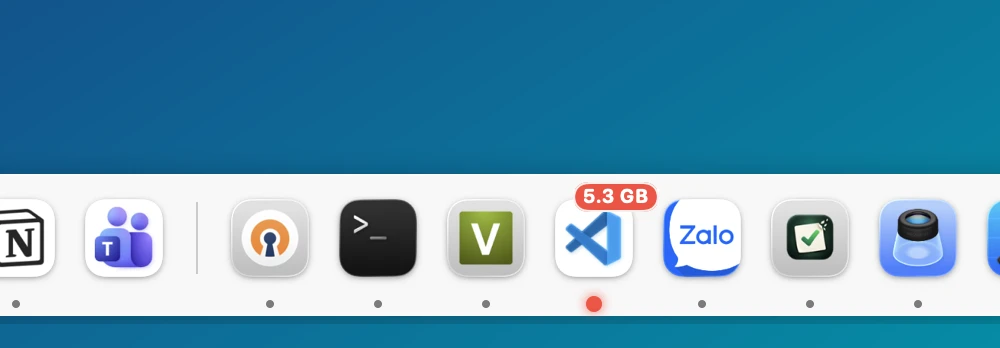
Captured from ScreenDocks 1.0 on a 16 GB MacBook Pro: Visual Studio Code is red at 5.3 GB; Chrome, Claude and Android Studio are yellow.
Sound familiar?
You work on the big monitor, the Dock lives on the laptop. Every app switch is a trip across two screens.
Memory got expensive, so most Macs keep the RAM they shipped with. Something is eating it, and the Dock won't tell you what.
Chrome alone is 40 helpers. Finding the one app worth quitting takes longer than the slowdown itself.
How it works
It copies your macOS Dock to every screen and tucks the original away. Quit ScreenDocks and your old Dock is back as it was.
Pick the edge, style and icon size per screen. Drag apps and folders from Finder to pin them, drag icons to reorder.
Yellow means heavy, red means the app slowing your Mac down. Hover to see how much memory it uses, right-click to quit it.
What it does
RAM on Dock · Pro
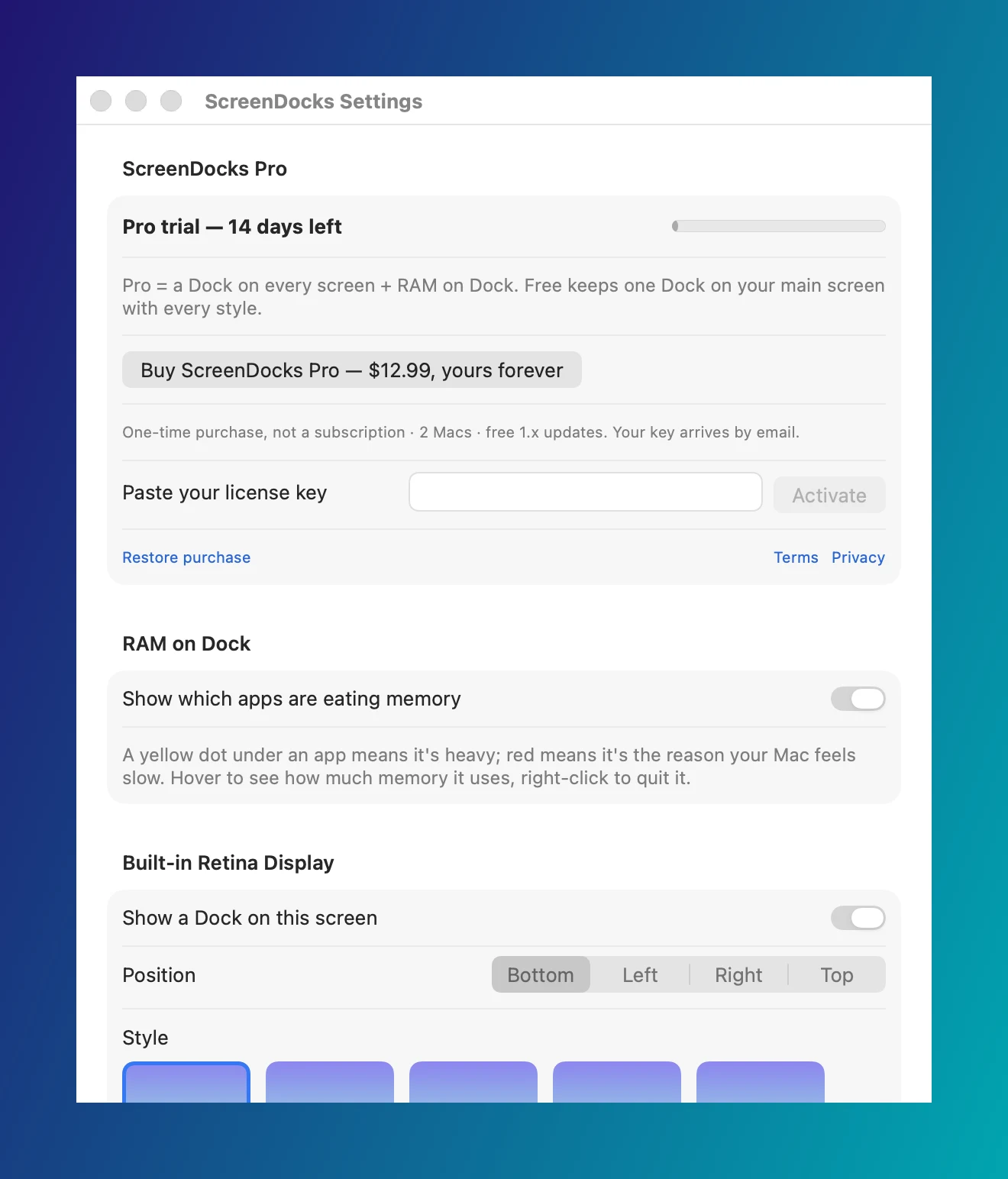
Under each running app, the dot changes color: yellow when the app is heavy, red with its size on the single heaviest app on your Mac. Hover to read the size, right-click → Quit, and the menu says how much it frees. Chrome with all its helpers counts as one app.
Every screen · Pro
Plug in a monitor and it gets a Dock. Pick the edge — bottom, left, right or top — the style and the icon size per screen. Unplug it and your setup is remembered for next time.
Settings
Your trial, your key, RAM on Dock and every Dock's options live in one Settings window, opened from the menu bar icon. Quit ScreenDocks and the macOS Dock is back exactly as it was.
Safe by design
No Accessibility, no Screen Recording, no Full Disk Access. It reads memory the way Activity Monitor does.
Quit ScreenDocks and the macOS Dock returns with your own settings, exactly as before.
It only quits the app you pick, and asks it to close normally. Never system processes.
No account, no analytics. The only network call checks a Pro key with Lemon Squeezy.
Pricing
$0
One Dock on your main screen with every style, magnification and auto-hide. Free forever.
Download free for Mac$12.99 once
A Dock on every screen and RAM on Dock. The 14-day free trial starts when you open the app — no card, no account. When it ends, your setup is kept and the main-screen Dock keeps working.
Already have the app? Buy, then paste the key from your receipt email in Settings → ScreenDocks Pro.
| Free | Pro | |
|---|---|---|
| Dock on your main screen, every style | ✓ | ✓ |
| Replace the macOS Dock | ✓ | ✓ |
| A Dock on every screen | — | ✓ |
| RAM on Dock: dots, sizes, Quit with the number | — | ✓ |
No subscription. A key works on 2 Macs. Sold through Lemon Squeezy.
Compare
Many Docks with widgets and stacks. Sold as a yearly or lifetime license.
ScreenDocks vs ExtraDock →A second Dock next to the macOS Dock, full of live widgets.
ScreenDocks vs Cooldock →Free and built in — but one Dock that jumps between screens, and no idea what is using memory.
ScreenDocks vs the macOS Dock →Updates
New Dock features and fixes, a few times a year. No spam, unsubscribe anytime.
No spam. Unsubscribe anytime.
Follow along
FAQ
No. ScreenDocks only turns on auto-hide for the original Dock while it runs, and puts your own setting back when you quit it. You can also keep the original Dock visible: turn off "Hide the macOS Dock" in the menu bar icon.
It reads how much memory each app uses straight from macOS, the same number Activity Monitor shows, and counts Chrome with all its helpers as one app. The heaviest app gets a red dot when it uses about a fifth of your RAM, sooner when macOS says memory is tight.
Free gives you one Dock on your main screen with every style, magnification and auto-hide. Pro adds a Dock on every screen and RAM on Dock. $12.99 once, not a subscription, 2 Macs, with a 14-day free trial.
Docks on your other screens and RAM on Dock turn off. Your setup is kept, and the Dock on your main screen keeps working. Buy Pro and everything comes back.
No Accessibility or Screen Recording permission, no account, no analytics. The only network call checks a Pro license key with Lemon Squeezy, the store that sells it.
macOS 14 Sonoma or later, Apple silicon and Intel. The download is signed with a Developer ID and notarized by Apple.
Free download. Pro is $12.99 once for every screen and RAM on Dock.
Download free for Mac