
How to Make a Game with Claude: We Built a 3D Browser Game in 2 Prompts
How to make a game with Claude, from a real build: the exact 2 prompts, timings and code size behind our 3D browser runner, plus a starter prompt to copy.
On this page · 9 sections
Can you make a game with Claude? We wanted a real answer, not a demo video. So we asked Claude Opus 5.5 for a 3D game and kept everything: the prompts, the timings and the code size.
The result is Fern Valley Run, a 3D dinosaur runner you can play right now in your browser. It took two short prompts. This guide shows exactly what we typed, what Claude did between the prompts, and how to make a game with Claude yourself, including a starter prompt you can copy.
We are a small studio that builds and ships apps and games with Claude every day. The numbers below come from the session log of this one build, not from estimates.
The short answer#
- Yes, Claude can make a playable game from plain language. Our first version was 549 lines and took about two minutes to write.
- The prompts were short. Prompt one asked for a demo. Prompt two asked for more appeal and more challenge.
- To make your own, describe one core action, ask for a single HTML file, play it, then ask for one round of changes.
- Claude can make 3D games in the browser with Three.js. Polished art and store releases still need extra work.
- Use the Claude app for one-file games and Claude Code for engine projects and store builds.
What we built: Fern Valley Run#
Fern Valley Run is a three-lane endless runner. A little low-poly raptor runs down a valley road. You swipe to switch lanes, jump rocks and logs, and grab amber to build a combo.
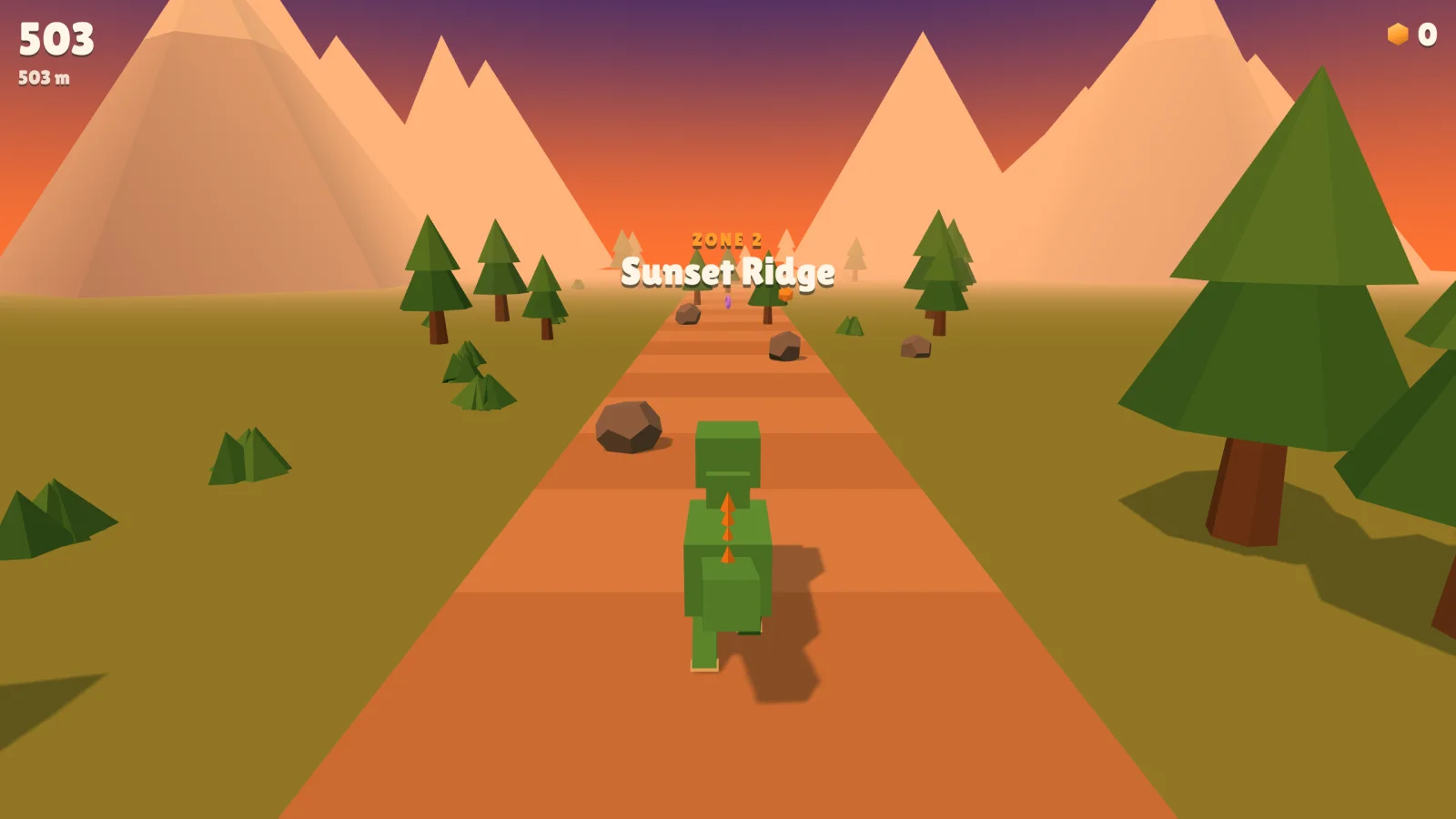
Here is the build, by the numbers from the session log:
| Version 1 | Version 2 | |
|---|---|---|
| Model | Claude Opus 5.5 | Claude Opus 5.5 |
| Prompt | "Make me a demo" | "More appeal, harder" |
| Time to write the file | about 2 minutes | about 3 minutes |
| Size | 549 lines | 777 lines |
| Image files | 0 | 0 |
| What was in it | 3 lanes, jump, amber, best score | 3 zones, ×5 combo, near-miss bonus, shield, magnet, logs, pterosaurs, rolling boulders |
From the first prompt to the second version going live in a private link was 26 minutes. Most of that was the roughly 18-minute gap while we tried version 1 and asked questions before the second prompt.
Everything you see is built from code. The raptor is a stack of boxes. The trees are cones on cylinders. The sky is a color gradient. The game uses one library, three.js, loaded from a CDN, and there is not a single image file in it.
The exact two prompts we used#
Both prompts were short and casual, typed in a quick chat. Here they are, translated into English as closely as we could.
Before prompt 1, the day before, we had asked Claude to research the 3D games people were showing off with Opus 5.5. It reported that most were single-file browser games built with Three.js. That research sat in the same chat, so Claude already knew the target.
Prompt 1:
uh, make me a demo and we'll see
That was the whole prompt. Claude picked the game itself: a dinosaur runner in a fern valley. It wrote the file, opened it in a browser, clicked Run, collected five amber, crashed into a rock, and checked that the "Bonk!" game-over screen showed the distance and best score. Only then did it share the link.
Prompt 2, after we tried it and asked whether it could reach the App Store:
just do it, don't worry, make it a bit more appealing + make it harder
Claude turned "more appealing" and "harder" into a concrete list before writing code:
- Appeal: three zones with their own sky (Fern Valley, Sunset Ridge from 450 m, Ember Fields from 1000 m), a combo that multiplies amber up to ×5, +15 points for a near miss, a one-hit shield and an 8-second amber magnet.
- Challenge: a higher top speed, denser rows of hazards, fallen logs that block every lane from 250 m, pterosaurs that sweep across lanes from 400 m, and rolling boulders from 650 m. It also added a swipe down to drop fast.
It then jumped straight to the 1000 m mark with a test flag to check the Ember Fields sky and the new logs. It told us plainly what it had not seen yet: the pterosaurs and boulders did not appear in its test run.
That honesty matters. A game that "builds" is not a game that plays well. Treat every AI build like a first draft from a fast teammate: play it before you trust it.
How to make a game with Claude, step by step#
You do not need our exact setup. This is the shortest path we know from idea to a game you can play on your phone.
- Pick one verb. Runners are "swipe". Flappy-style games are "tap". Puzzle games are "drag". One verb keeps the first version small enough to work.
- Ask for one HTML file. One file opens anywhere, needs no install, and is easy to share. Ask Claude to use three.js for 3D or plain canvas for 2D.
- Say how to win, how to lose and how to score. "The run ends when you hit an obstacle. Score is distance plus coins." Without this, you get a toy, not a game.
- Ask Claude to test it. In the Claude app you can play it in the artifact. In Claude Code, ask it to open the file in a browser and check the console for errors.
- Play it yourself on a phone. Touch controls feel different from a mouse. Write down the two things that annoyed you most.
- Ask for one round of changes. Group your notes into one prompt, like our "more appealing, harder". Small rounds beat long wish lists.
Here is a starter prompt we would use today. It is our suggested template, not the prompt from the build above:
Make a small 3D browser game as a single HTML file using three.js from a CDN.
Game: an endless runner on 3 lanes. Swipe or arrow keys to change lanes, tap or space to jump.
Lose: the run ends when the player hits an obstacle.
Score: distance plus collectibles. Save the best score in localStorage.
Look: low-poly shapes built in code, no image files, bright colors, works in portrait on a phone.
Before you finish: play it in a browser, check the console has no errors,
and tell me what you tested and what you could not test.
Swap the game line for your own idea. Keep the "before you finish" part. It is the line that turns "here is your code" into "here is a game I checked".
For more on writing briefs Claude can finish in one go, see our guide on how to use Claude Opus 5.5.
Can Claude make 3D games?#
Yes, in the browser. Three.js draws 3D with WebGL, which every modern browser on phones and computers supports. Claude writes the scene, the camera, the lights, the collisions and the game rules.
We are not the only ones seeing this. Since Opus 5.5 came out on September 22, 2026, developers have posted 3D prototypes built in a single session, and The Decoder tracked the jump from color blocks to full 3D prototypes. It also noted that these community tests have no standard scoring, and people tend to share their best result.
What Claude does well in a 3D game:
- Game logic: lanes, jumping, gravity, spawning hazards, scoring, combos and difficulty curves.
- Shapes from code: trees, rocks, mountains and characters made of boxes, cones and cylinders.
- Feel: camera follow, particles, sound effects made with the Web Audio API.
- Testing in a browser: when it has a browser tool, it can click through its own game.
Where you still need to step in:
- Art. Blocks look charming in a prototype but plain next to store games. Real models come from asset packs or 3D generators.
- Fun. Claude can follow "make it harder", but only you can tell whether it is fun or just annoying.
- Devices. Claude tested our build in a desktop browser and said it could not test swipes on a real phone. Touch controls are your job: test on the slowest phone you have.
- Originality. A three-lane runner is a crowded genre. A fast prototype is a way to test an idea, not proof the idea is good.
Claude app or Claude Code for games?#
Both can make a game with Claude. They suit different stages.
| Claude app (artifact) | Claude Code | |
|---|---|---|
| Best for | One-file prototypes | Real projects with many files |
| Play it | Right in the chat, or on a shared link | Opens your local files in a browser or game engine |
| Engines | Browser only (three.js, canvas) | Anything: three.js, Godot, Unity scripts |
| Testing | You play it | Can run tests and check its own build |
| Store release | No | Yes, with the right setup |
Fern Valley Run started as an artifact in a chat and later moved into our studio site with Claude Code. If you are choosing a coding tool, our comparison of Claude Code vs Cursor covers the trade-offs.
Mistakes to avoid when you make a game with Claude#
- Asking for everything at once. "An open-world RPG with crafting and multiplayer" gets you a half-working demo of each. Start with one verb.
- Skipping the lose condition. Without a way to fail, there is no tension and no reason to play again.
- Trusting "it works" without playing. Ask Claude what it tested and what it did not. Then play it yourself.
- Shipping web code straight to a store. Apple's guideline 4.2 can reject apps that are only a website in an app shell. Bundle the files offline or port to an engine.
- Calling it finished at version 1. The second prompt is where our game got its zones, combos and hazards. Most of the fun came from that round.
What happens next with Fern Valley Run#
The web version is live and free, with no download, no account and no ads. We count runs to decide one thing: do people come back for "one more run"?
If they do, we will port it to Godot for the App Store and Google Play, with real 3D models. If they do not, the prototype still did its job in 26 minutes instead of two weeks.
Play Fern Valley Run free in your browser, then try the starter prompt above and make a game with Claude of your own. To see which Claude model fits your project, read our Claude Opus vs Fable vs Sonnet comparison.
Frequently asked questions
Can you make a game with Claude?
Yes. Claude can write a complete, playable browser game from a plain-language prompt. We built Fern Valley Run, a 3D endless runner, with Claude Opus 5.5 in two prompts. The first version was 549 lines of HTML and JavaScript and took about two minutes to write. You can play it free at oneclicktool.app.
Can Claude make 3D games?
Yes, for browser games. Claude writes 3D games with the Three.js library, building characters, trees and terrain from simple shapes in code. That is enough for a fun prototype. It does not produce polished 3D models or art on its own, so a store-quality game still needs real models from an asset pack or a 3D generator.
Do I need to know how to code to make a game with Claude?
Not for a first prototype. You describe the game, Claude writes the file, and you play it. You do need to judge what is fun and describe what to change. Knowing a little HTML helps when you want to host the game yourself or fix small things without another prompt.
Should I use the Claude app or Claude Code to make a game?
Use the Claude app when the game fits in one HTML file and you want to play it right away in an artifact. Use Claude Code when the game needs many files, a game engine like Godot, tests, or a build for the App Store and Google Play.
How long does it take to make a game with Claude?
A small arcade game takes minutes, not days. Our first version was written in about two minutes and the improved version in about three. The whole session, including the time we spent trying version 1 between the two prompts, was 26 minutes. Turning a prototype into a store-ready game takes much longer.
Can I put a game made with Claude on the App Store?
Yes, but plan for it. Apple can reject apps that are only a website wrapped in an app shell under guideline 4.2, so a Three.js prototype usually needs packaging with its files bundled offline, or a rewrite in an engine such as Godot. We are taking the Godot route only if the web version proves people keep playing.
Sources
- Anthropic — Introducing Claude Opus 5.5 (Sep 22, 2026)
- TechCrunch — Anthropic releases Opus 5.5 with lower prices and Fable-level performance (Sep 22, 2026)
- The Decoder — Claude Opus 5 pushes prompt-to-game AI from rough color blocks to full 3D prototypes
- daily.dev — Opus 5.5 is actually insane for game dev
- three.js — Documentation
- Apple — App Store Review Guidelines, 4.2 Minimum Functionality