
Why Is My Mac So Slow? The 2 Hidden Reasons (We Measured Ours)
Why is my Mac so slow, even with plenty of storage? We measured a slow 16 GB MacBook Pro: memory, swap and a full disk. Find yours in 2 minutes and fix it.
On this page · 12 sections
- The short answer
- Why is my Mac so slow all of a sudden?
- What did we measure on our own slow Mac?
- How do I check why my Mac is slow?
- Why is my Mac slow when I have plenty of storage?
- Does a full disk slow down a Mac?
- What does a slow Mac really cost you?
- Why don't the usual fixes stick?
- How to fix a slow Mac by cause
- Is there one place to see all of this?
- Bottom line
- Frequently asked questions
Why is my Mac so slow? You click, and the spinning wheel shows up. You switch apps, and the window takes three seconds to draw. The fan spins up while you are typing an email. You already deleted old downloads, maybe you even restarted, and it is still slow.
Here is what most guides miss: there are two different kinds of "slow", and the fix for one does nothing for the other. One lives in memory. The other lives on your disk. We measured both on our own work Mac, a 16 GB MacBook Pro that felt sluggish this week, and the numbers surprised us.
We build Mac apps for a living, so our Mac runs Xcode, Android emulators, Chrome and AI coding tools at the same time. It is a good stress test. By the end of this post you will know which kind of slow you have and how to fix it in a few minutes.
The short answer#
- Check memory first. Open Activity Monitor, click Memory, and read Memory Pressure and Swap Used. Yellow or red means memory is the problem.
- Plenty of storage does not mean fast. Our Mac had 420 GB free and still used 17.1 GB of swap.
- A nearly full disk is the second trap. macOS needs free space for swap and caches. Free space first if you are under about 10%.
- Fix by cause, not with a generic "cleanup". Quit the one app that holds the memory, clear what really fills System Data, and stop forgotten background jobs.
Why is my Mac so slow all of a sudden?#
A Mac rarely slows down "for no reason". Almost every case comes from one of five causes:
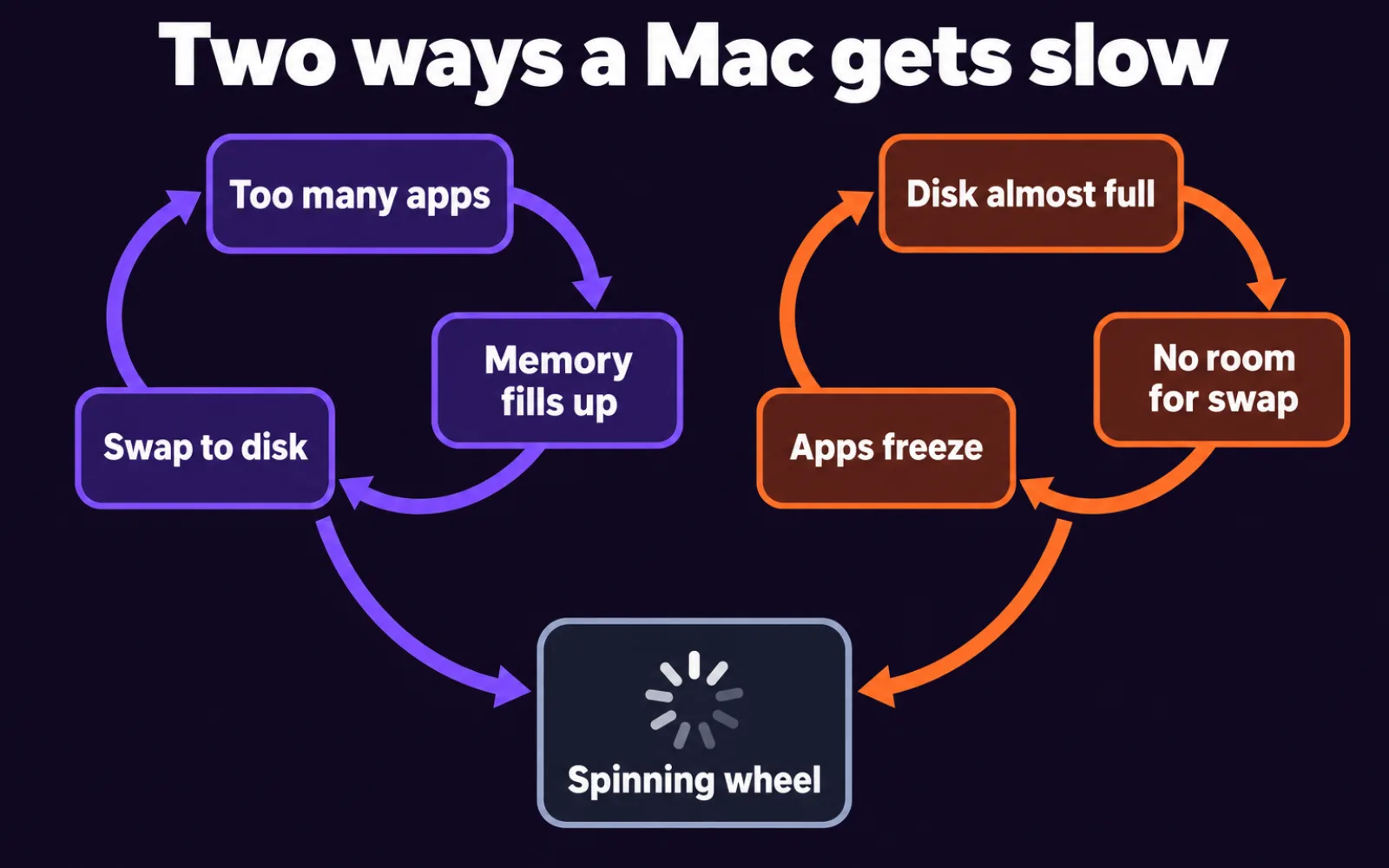
- Memory is full. Apps and browser tabs want more RAM than the Mac has. macOS compresses memory, then moves the rest to swap files on the SSD. Reading it back is far slower than reading RAM, so everything feels sticky.
- The disk is almost full. Swap, caches and app updates need free space. With only a few gigabytes left, macOS cannot make room fast enough and apps stall.
- One process is burning the CPU. A stuck app, a browser tab running a video, or a background task like Spotlight indexing or Photos analysis keeps the processor busy. The fan is the giveaway.
- Forgotten background work. Dev servers, emulators, AI agents and helper apps keep running after you stop looking at them. Each one holds memory.
- Old hardware on a new macOS. Sometimes the Mac really is too old. This is the least common cause, so rule out the other four first.
The first two are the big ones, and they feed each other. Full memory pushes data to disk. A full disk leaves no room for that data. Both end in the same spinning wheel.
What did we measure on our own slow Mac?#
Tested on our MacBook Pro (M1 Pro, 10-core CPU, 16 GB of RAM), macOS 26.3, October 23, 2026, after 3 days and 5 hours without a restart. It felt slow: app switching lagged and the fan came on for no clear reason. Here is what the numbers said.
| What we checked | Result | What it means |
|---|---|---|
| Free space on the startup disk | 420 GB of 926 GB free | Disk space is not the problem here |
| Swap Used | 17.1 GB of 18.4 GB, across 18 swap files | Memory overflowed onto the SSD |
| Memory pressure | Warning (yellow) | macOS is struggling to find free RAM |
| Compressed memory | About 45 GB squeezed into about 8 GB of RAM | macOS was compressing hard before swapping |
| Written to swap since restart | About 1.2 TB in 77 hours | Constant traffic between RAM and SSD |
| Written to swap in one quiet minute | 455 MB | Still swapping while we did almost nothing |
| Running processes | 955 | Too many rows to read in Activity Monitor |
| Load average (1 minute) | 30.4 on 10 cores | About 3 tasks waiting for each core |
| Biggest memory user | Android emulator, 8.3 GB | One app held half the RAM |
| Biggest CPU user | Photos media analysis, 121% CPU | A background task kept the fan busy |
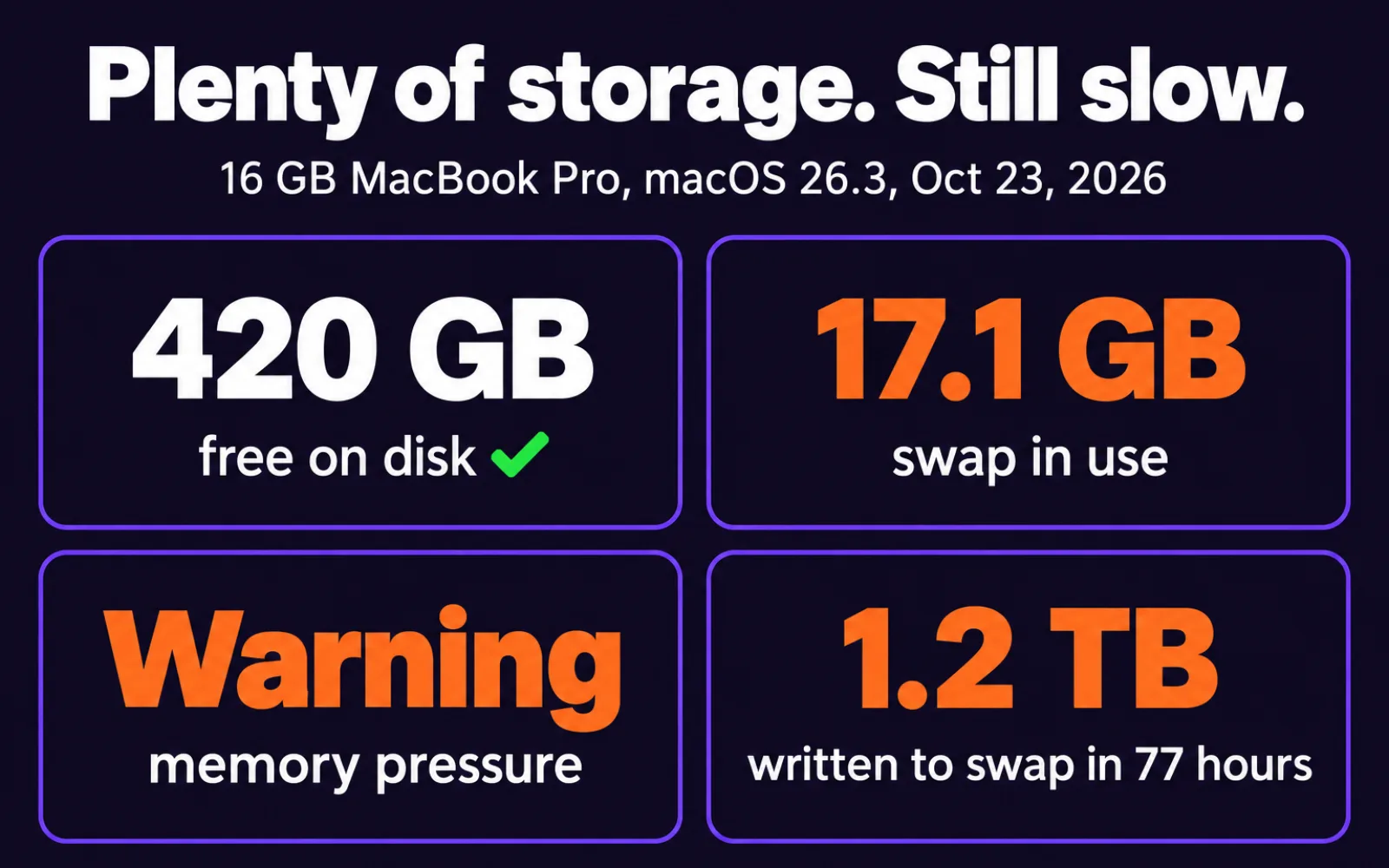
The lesson: our disk was half empty, yet the Mac was slow. If we had run a "disk cleaner", we would have deleted gigabytes of caches and felt no difference. The real cause was one Android emulator holding 8.3 GB, plus a pile of apps we had stopped using days ago.
The same Mac also had 11 GB in ~/Library/Caches and 21 GB of iOS simulators. That matters on a smaller disk. On a 256 GB MacBook Air those two folders alone would be about 12% of the drive.
How do I check why my Mac is slow?#
This takes about two minutes and needs nothing you have to install.
- Press Command + Space, type Activity Monitor, and press Return.
- Click the Memory tab. At the bottom, look at the Memory Pressure graph and Swap Used. Apple says green means the Mac is using its RAM well, yellow means it may need more, and red means it needs more RAM.
- Click the Memory column header to sort by size. Note the top three apps. Chrome, Safari and dev tools split into many rows, so add up their helpers.
- Click the CPU tab and sort by % CPU. Anything above 80% for more than a minute while you are not using it is a suspect.
- Open System Settings > General > Storage. Look at the free space at the top and the size of System Data.
- Write down three numbers: memory pressure color, Swap Used, and free disk space. They tell you which section below to read.
If pressure is green, swap is under a few gigabytes and you have plenty of free space, the slowdown is probably one hot process from step 4. Our guides on kernel_task high CPU and WindowServer high CPU cover the two that confuse people most.
Why is my Mac slow when I have plenty of storage?#
Because storage and speed are different things. Free disk space is like an empty warehouse. Memory is the desk you work at. A huge empty warehouse does not help if your desk is covered.
When the desk fills up, macOS does three things in order:
- It compresses memory that apps are not using right now. That costs CPU time.
- It swaps the rest to files on the SSD. That costs disk time, and reading it back is slower than RAM.
- If both run out, it pauses apps and shows the "Your system has run out of application memory" window. We wrote a full guide on what that message means and how to fix it.
Our Mac was stuck between steps 1 and 2 all day. Nothing crashed, so nothing warned us. It just got a little slower every hour, which is the worst kind of slow because you blame yourself, the Wi-Fi or "old age" instead of the real cause.
Does a full disk slow down a Mac?#
Yes, once it gets close to full. macOS writes swap files, caches, logs and update files to the startup disk all the time. When free space drops to a few gigabytes, it cannot grow swap. Apps that need memory now have nowhere to put it, so they freeze.
There is no official Apple number for "too full". Many repair guides use a rule of thumb of keeping 10 to 15% free. On a 256 GB Mac, that is about 25 to 40 GB.
The painful part is System Data. In Storage settings it is one grey bar, often 40 GB to over 100 GB, with no list of what is inside and no delete button. Inside you usually find:
- Time Machine local snapshots (how to delete them safely)
- App and browser caches (is it safe to delete Library Caches?)
- Xcode build files and simulators (Xcode taking up too much space)
- Old iPhone and iPad backups
- Swap files themselves, which grow when memory is tight
That last one is the trap that ties both problems together. Heavy memory use makes swap files. Swap files fill System Data. A fuller disk leaves less room for swap. Our full walk-through is in Mac System Data too large.
What does a slow Mac really cost you?#
It is easy to shrug off a few seconds. Add them up.
Say the spinning wheel costs you 5 seconds, 40 times a day. That is over 3 minutes a day, about 15 minutes a week and more than 12 hours a year, waiting for a Mac that is supposed to be fast. That example is our own arithmetic, not a study, but most people who are asking "why is my Mac so slow" lose more than that.
Then there are the costs you do not see:
- Lost focus. A three-second freeze breaks your train of thought. Getting back into the task takes longer than the freeze itself.
- Heat and battery. A busy CPU and constant swapping keep the fan on and drain the battery faster. On our Mac, one background media task alone sat at 121% CPU.
- Writes to your SSD. Our Mac wrote about 1.2 TB to swap in 77 hours. SSDs handle a lot of writes, but there is no reason to spend them on swap you could avoid.
- The panic buy. Many people decide their Mac is "dying" and start pricing a new one. Often the real fix was quitting one app.
- The risky cleanup. Others paste Terminal commands from a forum, or let a cleaner app delete "14,382 junk files" they never looked at. That is how people lose iPhone backups and app data.
Why don't the usual fixes stick?#
Most advice treats a slow Mac as one problem with one fix. It is not, so the fix fades.
| Usual fix | What it really does | Why the slowness comes back |
|---|---|---|
| Restart the Mac | Clears memory and swap | The same apps fill memory again within hours |
| Delete old downloads | Frees disk space | Does nothing if memory was the problem |
| Run a cleaner app | Deletes caches in bulk | Caches rebuild, often slowing the next app launch; many cost about $40 a year |
| Close a few browser tabs | Frees some memory | The big user was an emulator or a dev tool, not the browser. If it really is the browser, see Chrome using too much memory |
| Paste a Terminal command | Deletes or purges something | You do not know what it removed, and Terminal deletes skip the Trash |
| Buy a new Mac | More RAM and storage | Works, but costs $1,000 or more when the cause was often one app |
The fix that lasts is boring: find the cause with real numbers, remove only that, and check again a day later.
How to fix a slow Mac by cause#
Match the numbers you wrote down to the row below.
| What you saw | Likely cause | Fix |
|---|---|---|
| Memory pressure yellow or red, swap over a few GB | Memory full | Quit the top one or two memory users. Close tabs you have not used today. Restart if swap stays high. |
| Under about 10% free disk | Disk nearly full | Free space: snapshots, caches, old backups, big files. Then check memory again. |
| One process over 80% CPU for minutes | Hot process | Quit it. If it is a system process, read our guide for that process before forcing anything. |
| Many node, python or emulator rows | Forgotten background jobs | Stop the dev servers and emulators you are not using. See how to find and kill forgotten dev servers. |
| Slow only after a macOS update | Indexing and analysis | Leave the Mac on and plugged in for a few hours so Spotlight and Photos finish, then check again. |
| All green, plenty of space, still slow | Older hardware or a failing disk | Run Disk Utility First Aid and check the age of the Mac before buying anything. |
Two habits keep it fixed: restart at least once a week, and glance at Memory Pressure when the Mac feels slow instead of guessing.
Is there one place to see all of this?#
Not in macOS. The answers are spread across three tools. Activity Monitor shows memory but splits apps into hundreds of rows. Storage settings shows a grey System Data bar without names. Finder shows files but not what macOS will rebuild. And Terminal is fast but deletes for good.
That gap is why we are building Mac Fix Kit, a small Mac app now in early access. It puts both kinds of slow in one window:
- Storage: System Data broken into named items with real sizes, such as snapshots, caches, Xcode files and old backups, each with a plain-English line on what it is and whether macOS makes it again.
- Memory: memory pressure and swap the way macOS reports them, the apps using the most, and a Quit button for one app at a time.
- Processes: dev servers, emulators and AI agents still running, grouped by project.
- Safe by design: everything it clears goes to the Trash, every cleanup has Undo, and it never lists or quits macOS system processes.
It is not out yet. The plan is a free version that shows everything and lets you clean by hand, and a $19 one-time Pro with one-click cleanup and a menu bar warning before memory runs out. If that sounds useful, join the Mac Fix Kit early access list and you will get one email when the beta is ready.
If you would rather do it all yourself, every step in this post works with the tools already on your Mac.
Bottom line#
A slow Mac is almost always one of two things: full memory or a nearly full disk. Check Memory Pressure and Swap Used before you delete anything. Our Mac had 420 GB free and was still slow because one emulator held 8.3 GB of RAM. Fix the cause you can see in the numbers, then check again tomorrow.
Next, read what to do when your Mac runs out of application memory or why Mac System Data gets so large.
Frequently asked questions
Why is my Mac so slow all of a sudden?
Usually because memory just ran out. One new heavy app, a browser with many tabs, or a background task such as Photos analysis or Spotlight indexing pushes macOS into swap. Open Activity Monitor, click Memory, and look at the Memory Pressure graph and Swap Used at the bottom.
Why is my Mac slow when I have plenty of storage?
Free storage does not make a Mac fast. Speed depends on memory and CPU. Our Mac had 420 GB free and still used 17.1 GB of swap with memory pressure at warning. If pressure is yellow or red, quit the biggest apps; disk space is not your problem.
Does a full disk slow down a Mac?
Yes, when it is nearly full. macOS keeps swap, caches and temporary files on the startup disk. With only a few gigabytes left it cannot grow swap, so apps stall or you see the out of application memory warning. Free space first, then check memory.
Is it bad for my Mac to use a lot of swap?
Some swap is normal. Heavy swap all day makes the Mac slow and writes a lot to the SSD. Our Mac wrote about 1.2 TB to swap in 77 hours. Apple says a Memory Pressure graph that stays red means the Mac needs more RAM.
Will restarting my Mac make it faster?
For a while. A restart closes every app and clears swap. Our Mac had been up for 3 days with 17 GB of swap. If it slows down again within a day, the cause is an app or a habit, not the restart schedule, so find it in Activity Monitor.
Do I need a cleaner app to speed up my Mac?
No. Everything in this post can be done with Activity Monitor, System Settings and Finder. A tool only saves time by showing memory, hot apps and what fills System Data in one place. Avoid any app that shows scary warnings or deletes without the Trash.
Sources
- Apple Support — View memory usage in Activity Monitor on Mac: memory pressure, compressed memory and Swap Used (checked Oct 23, 2026)
- Apple Support — Check if your Mac needs more RAM in Activity Monitor (checked Oct 23, 2026)
- Apple Support — Free up storage space on Mac (checked Oct 23, 2026)
- Google Autocomplete, US — suggestions for 'why is my mac so slow' and 'mac running slow' (measured Oct 23, 2026)
Related reading
Mac Apps & Tips
Your System Has Run Out of Application Memory on Mac: What It Means and How to Fix It
Your system has run out of application memory on your Mac? Find what is really using the RAM, why Chrome is often blamed, and how to fix it now and for good.
Chrome & Browser Fixes
Why Is Chrome So Slow? 9 Real Causes, Ranked, and What Actually Helps
Why is Chrome so slow all of a sudden? Find the cause in 2 minutes with Chrome's task manager, then fix tabs, extensions, memory and settings that drag it down.

Chrome & Browser Fixes
What Is Site Data? Cache, Cookies, Local Storage, IndexedDB and Service Workers in Plain English
What is site data? A plain-English guide to the six things a website stores in your browser, what each one is for, and what you lose when you clear it.