 Markdown Viewer
Claude Code Markdown Viewer: 4 Ways to Read the Files Claude Writes
Need a Claude Code markdown viewer? Compare 4 real ways to read CLAUDE.md, skills and plans, and see the links between files before your docs folder gets messy.

On this page · 13 sections
- The short answer
- Why Claude Code leaves you with so much Markdown
- 1. Read it in the terminal with Glow
- 2. VS Code Markdown preview
- 3. Quick Look and single-file viewers
- 4. Tools built for Claude Code
- The four ways compared
- What every single-file viewer misses
- Step by step: map your Claude Code docs folder
- Habits that keep a Claude Code docs folder readable
- Where this is going: Claude inside the viewer
- Which Claude Code markdown viewer should you use?
- Frequently asked questions
If you use Claude Code for more than a week, you end up with a lot of Markdown. CLAUDE.md, SKILL.md, plans, specs, notes. A good Claude Code markdown viewer turns that pile back into something you can read. The trouble is that most viewers show one file at a time, and the real problem is the whole folder.
We build and ship apps with Claude Code every day. Our repos hold hundreds of Markdown files. This guide covers the four real ways to read them, what each one does well, and where each one stops once your docs folder grows.
The short answer#
- Terminal: Glow renders Markdown in your shell and lists every .md file in the repo. Fast, but one file at a time.
- VS Code: the built-in preview plus link checks and Find All References. Best if you already live in VS Code.
- Quick Look and single-file apps: press Space in Finder or open one file in a viewer app. Great for a quick glance.
- Claude Code tools: MarkView, claude-plan-visualizer and a cmux skill show what Claude just wrote.
- What none of them show is the shape of the folder: which file links to which, and which files nothing links to. For that, map the folder.
Why Claude Code leaves you with so much Markdown#
Claude Code has no database for instructions. It reads and writes plain Markdown files, and the official docs spell out where they live:
- CLAUDE.md in the project root (or
.claude/CLAUDE.md), plus~/.claude/CLAUDE.mdfor personal rules andCLAUDE.local.mdfor private project notes. - Nested CLAUDE.md files in subfolders, which load on demand when Claude works in that folder.
- Rules in
.claude/rules/, one topic per file. - Skills at
.claude/skills/<name>/SKILL.md, each with optional supporting files that SKILL.md links to. - Plans from plan mode, saved to
~/.claude/plansunless you setplansDirectory. - Auto memory in
~/.claude/projects/<project>/memory/, with aMEMORY.mdindex and one topic file per memory.
Add the specs, design notes and READMEs Claude writes for you, and even a small project fills up fast.
These files also point at each other. CLAUDE.md can pull in other files with @path/to/file imports, up to four hops deep. A SKILL.md links to its reference files. MEMORY.md is an index of topic files. So the folder is not a list. It is a web.
That matters. If a link breaks, or a file stops being referenced, Claude may never read it again. You need to see the files and the links between them.
1. Read it in the terminal with Glow#
Glow is a free terminal Markdown reader. On a Mac, install it with brew install glow.
Run glow with no arguments and it opens a file browser. It searches the current folder and its subfolders. Inside a Git repository, it searches the whole repo. Pick a file and you get rendered headings, lists and code blocks in a pager with less-style keys.
What it does well: you never leave the terminal where Claude Code runs. It is quick, light, and good for reading one plan while Claude waits.
What it misses: it is a reader, not a map. You see a list of files and the one you opened. You do not see which files link to which, and you cannot spot a file nothing points to.
2. VS Code Markdown preview#
VS Code ships a solid Markdown preview. Open a .md file and press Cmd+Shift+V on a Mac (Ctrl+Shift+V on Windows and Linux). Press Cmd+K V (Ctrl+K V) to put the preview beside the source.
It goes further than most people know:
- Link checks. Set
"markdown.validate.enabled": trueand VS Code warns about broken links to files, headers and reference links. It is off by default, and it does not check web links. - Find All References (
Shift+Option+F12on a Mac) lists every link to a header or file across the workspace. - Rename (
F2) a header or file and update the links to it.
If you use the Claude Code extension, there is a bonus. In plan mode, VS Code opens Claude's plan as a full Markdown document, and you can add inline comments before Claude starts.
What it does well: this is the strongest free option for checking links, and it is where many people already work. Be fair to it: if you only need a preview and broken-link warnings, VS Code is enough.
What it misses: you see links one file at a time. Find All References answers "who links here?" for a single file. There is no view of the whole folder as a graph, and no list of files that nothing links to. It also means opening an IDE just to read docs.
3. Quick Look and single-file viewers#
On a Mac, the fastest way to look at a file is Quick Look: select it in Finder and press Space. QLMarkdown is a free, open-source Quick Look extension that renders Markdown in that preview. Install it with brew install --cask qlmarkdown. Its own README says it is not meant to be a standalone viewer or editor.
There are also many single-file viewer apps for Mac and Windows. We compare them in our guide to the best Markdown viewer for Mac.
What it does well: zero setup once installed, and a clean rendered page in a second.
What it misses: one file, no context. You cannot follow a link from CLAUDE.md to the doc it imports and back, and you see nothing about the rest of the folder.
4. Tools built for Claude Code#
The search results for this topic are mostly small tools made for Claude Code itself. Each solves a real, narrow job.
MarkView is a native macOS Markdown previewer with an MCP server. Add it with claude mcp add --transport stdio --scope user markview -- npx mcp-server-markview, and Claude can open a live-reloading preview of what it writes. It supports GitHub-flavored Markdown, Mermaid diagrams and Quick Look. It is MIT licensed and needs macOS 14 or later to build from source.
claude-plan-visualizer is an npm package (npm i -g claude-plan-visualizer) that serves your plan files in the browser. It looks for .claude/plans or docs/plans in the folder where you run it, and you can add more folders with --dir. You get a sidebar grouped by date, a table of contents, Cmd+K search, and an optional hook that opens it when Claude exits plan mode.
cmux-markdown is a skill for the cmux environment. It opens a Markdown file in a panel next to your terminal and re-renders it when the file changes on disk.
What they do well: they meet you inside the Claude Code workflow. MarkView's live preview and the plan visualizer's date-grouped list are both nice touches.
What they miss: they focus on the file Claude just wrote, or on one kind of file. None of their pages describe a view of links between files or a list of orphan files.
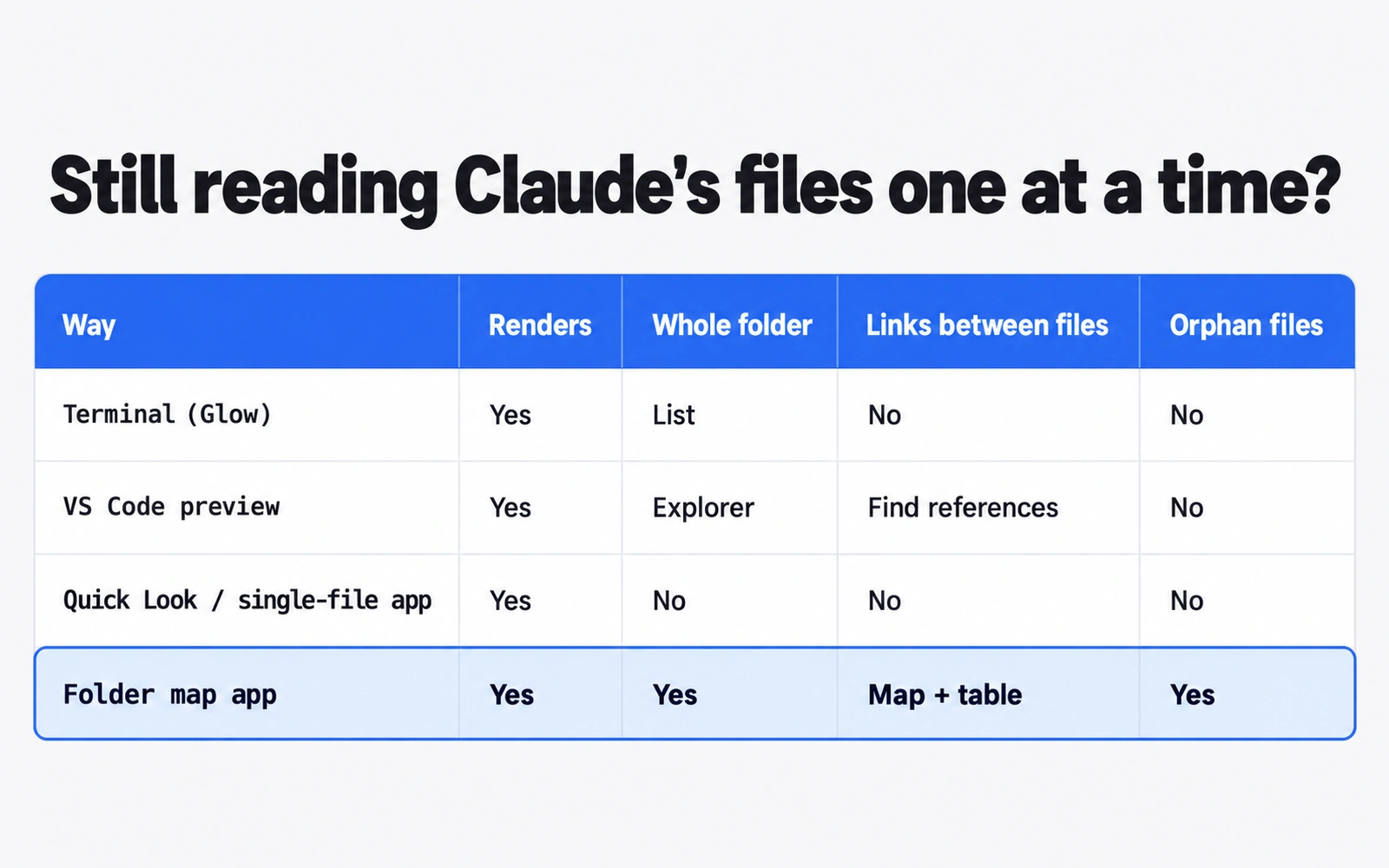
The four ways compared#
| Renders Markdown | Whole folder | Links between files | Orphan files | |
|---|---|---|---|---|
| Terminal (Glow) | Yes | File list | No | No |
| VS Code preview | Yes | Explorer tree | Per file (Find All References) | No |
| Quick Look / single-file app | Yes | No | No | No |
| Claude Code tools (MarkView, plan visualizer, cmux) | Yes | Chosen folders (visualizer) | No | No |
| Folder map app | Yes | Yes | Map and table | Yes |
What every single-file viewer misses#
Once a repo has dozens of CLAUDE.md, SKILL.md, plan and spec files, reading them one at a time stops working. Two questions matter more than how pretty one page looks.
What is the shape of this folder? Which folders hold the rules, which hold skills, which hold old plans you forgot about. A tree in a sidebar shows names, not meaning.
How are the files linked? CLAUDE.md should point to the docs Claude needs. Skills should point to their references. A file that nothing links to is an orphan. Claude may never open it, and you may forget it exists. Old plans that contradict new rules often end up there.
This is the exact problem that made us build Markdown Viewer. We could read any single file just fine. We could not see how our hundreds of files fit together.
Step by step: map your Claude Code docs folder#
Here is the workflow we use. It works with any tool that shows a whole folder. We use Markdown Viewer, our free app for macOS 11+ and Windows 10/11. It is read-only, so it never edits, moves or deletes your files.
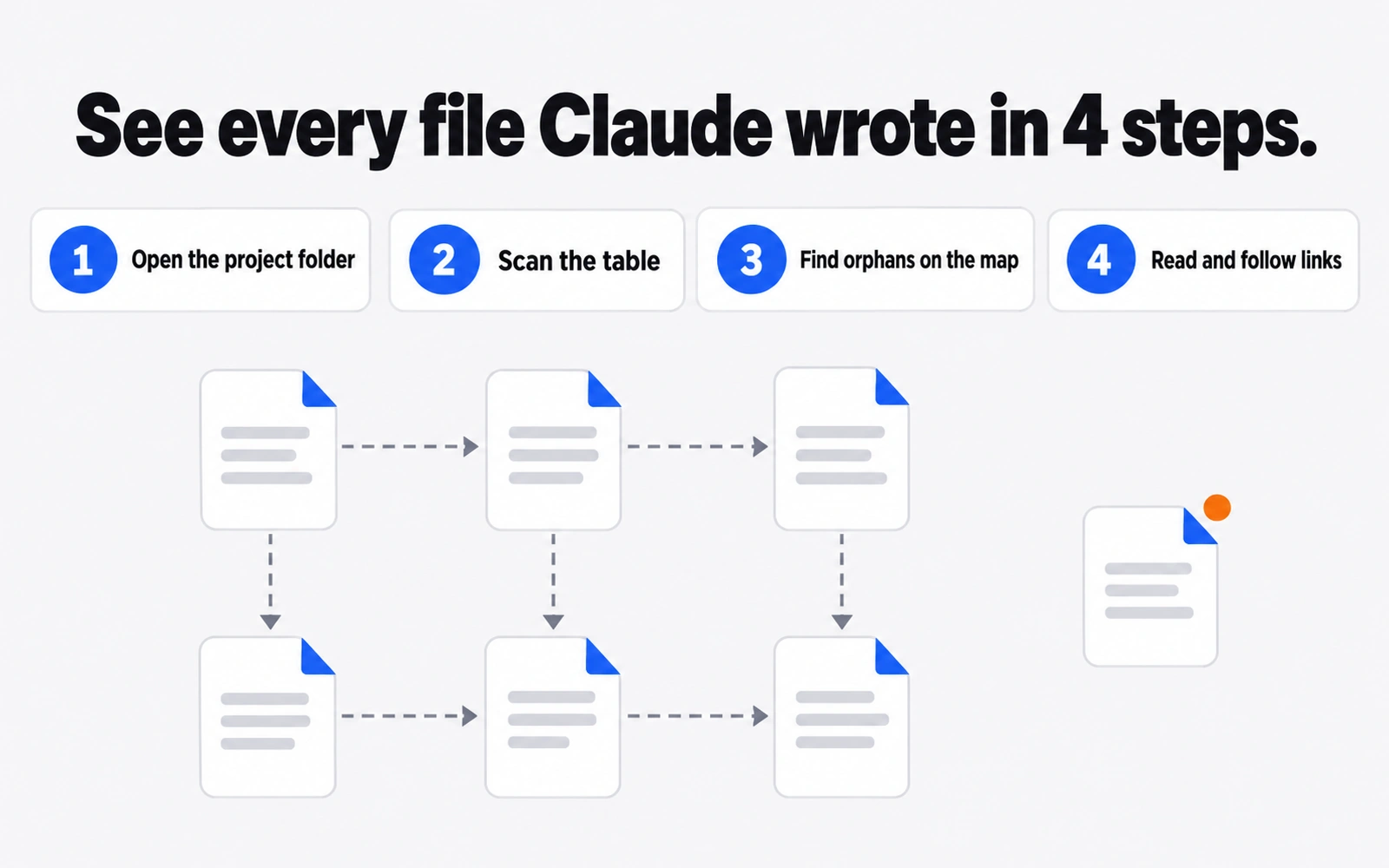
Step 1: Open the project folder#
Add your project folder, the one with CLAUDE.md at its root. You can add up to 10 folders, so add ~/.claude too if you want to see your personal CLAUDE.md, skills and plans next to the project.
Markdown Viewer skips .git, node_modules and build output folders such as dist and .next. The .claude folder is included, so .claude/skills, rules and agents show up next to your docs without extra setup. Subfolders show up as tabs.
Step 2: Scan the table#
Switch to Table view. Each file gets a row with its title, file name, links in, links out and last update, grouped by folder. Sort by last update to find stale plans. Sort by links in to see which files carry the project, often CLAUDE.md and a few core docs.
A file with zero links in and an old date is a strong candidate for cleanup or for a link from CLAUDE.md.
Step 3: Find orphans on the map#
Switch to Map view. Each file is a card, grouped by folder, and dashed arrows show the links between them. Files that nothing links to get an orange dot.
Walk the orange dots one by one. For each orphan, decide: should CLAUDE.md or a skill link to it, should it move, or is it dead? Then fix it in your editor or ask Claude Code to do it.
For broken links, turn on VS Code's markdown.validate.enabled as described above. The two checks work well together: VS Code catches links that point nowhere, and the map catches files nothing points to.
Step 4: Read and follow links#
Open any card in the Reader. It renders tables, code, task lists and local images. Click a link to jump to the linked file, and use back and forward like a browser. This is the fastest way to check that the chain from CLAUDE.md to your docs reads the way Claude will read it.
Leave the app open while Claude works. It refreshes live when a file changes on disk, so new plans and specs show up as Claude writes them.
Habits that keep a Claude Code docs folder readable#
A viewer helps, but the folder still needs a few habits.
- Keep CLAUDE.md short and point outward. The docs say shorter files get better adherence. Move detail into separate docs and link to them. Our CLAUDE.md best practices guide covers this in depth.
- Pick one home for plans. Set
plansDirectoryto a folder inside your repo, such as"./plans", so plans are versioned and visible next to the code. Our post on the Claude Code plan file location walks through it. - Write decisions down before context runs out. Long sessions forget. Decisions saved to a file survive a compact. See what to do when Claude Code context is full.
- Review orphans once a week. Ten minutes on the map beats finding out a month later that Claude never read your new rules.
Where this is going: Claude inside the viewer#
Reading is half the job. The other half is asking Claude to fix what you find. We are building Markdown Everywhere, a Pro edition for Mac that adds editing and a Claude panel that runs your own Claude Code inside the open folder. It is coming soon, as a one-time purchase with no subscription. See what Pro will include.
Which Claude Code markdown viewer should you use?#
- You live in the terminal: use Glow for quick reads.
- You live in VS Code: use its preview, turn on link validation, and use the plan review in the Claude Code extension.
- You want a quick look: use Quick Look with QLMarkdown, or a single-file app.
- You want to watch what Claude writes: try MarkView or claude-plan-visualizer.
- You need to see the whole folder, the links and the orphans: open it in a folder map like Markdown Viewer, free for Mac and Windows.
Most people end up with two: one for reading a single file fast, and one for seeing the whole folder. If you are new to Claude itself, start with our Claude guide.
Frequently asked questions
Does Claude Code have a built-in markdown viewer?
Not in the terminal. Claude Code writes plain .md files, and you read them with another tool. The VS Code extension opens plan-mode plans as a full Markdown document you can comment on. An April 2026 GitHub request to render Markdown in the desktop app's file viewer was closed as not planned.
How do I preview Claude Code markdown files in VS Code?
Open the .md file and press Cmd+Shift+V on a Mac or Ctrl+Shift+V on Windows and Linux for a preview tab. Press Cmd+K then V (Ctrl+K then V) to open the preview beside the source. Turn on markdown.validate.enabled to get warnings for broken links to files and headers.
Where does Claude Code save plan files?
By default, plans from plan mode go to ~/.claude/plans in your home folder, not your repo. You can change this with the plansDirectory setting, for example "./plans". The path is resolved from the project root, and Claude Code falls back to ~/.claude/plans if it points outside the project.
Why does the Claude desktop app show raw markdown?
Its file viewer displayed .md files as raw text, with the # and ** symbols visible, according to a GitHub issue opened in April 2026. The issue was closed as not planned. The workaround in the issue is to right-click the file and use Open in to send it to another app.
Can I view markdown files in the terminal?
Yes. Glow is a free terminal Markdown reader. Install it on a Mac with brew install glow. Run glow with no arguments and it lists the Markdown files in the current folder and its subfolders, or the whole repo inside a Git repository. Pick one to read it rendered.
Sources
- Claude Code docs — How Claude remembers your project (CLAUDE.md, imports, auto memory)
- Claude Code docs — Extend Claude with skills
- Claude Code docs — All settings: plansDirectory
- Claude Code docs — Explore the .claude directory
- Claude Code docs — Use Claude Code in VS Code
- anthropics/claude-code issue #49353 — File viewer in desktop app shows raw markdown (Apr 2026)
- VS Code docs — Markdown and Visual Studio Code
- Glow — terminal Markdown reader (charmbracelet/glow)
- QLMarkdown — Quick Look extension for Markdown
- MarkView — macOS Markdown preview with MCP server
- claude-plan-visualizer — local viewer for Claude Code plans
- cmux-markdown skill (manaflow-ai/cmux)
Related reading

AI Tools & Models
Claude Code Plan File Location: Where Plans Are Saved and How to Move Them
The Claude Code plan file location is ~/.claude/plans by default. See how plan files are named, how plansDirectory moves them, and how to review them.
AI Tools & Models
Claude Code vs Cursor (2026): Terminal Agent or AI Editor?
Claude Code vs Cursor compared on price, models, workflow and limits, with a clear rule for when to pick the terminal agent, the AI editor, or both.

AI Tools & Models
Claude Code Context Full? What to Do Before Auto-Compact Eats Your Decisions
Claude Code context full? Learn what auto-compact keeps and drops, when to use /compact vs /clear, and how Markdown files keep your decisions safe.