 Markdown Viewer
CLAUDE.md Best Practices (2026): Keep It Short, Point to Your Docs
CLAUDE.md best practices from the official docs: where it lives, how long it should be, what to put in it, a starter template, and fixes when Claude ignores it.
On this page · 12 sections
- The short answer
- What a CLAUDE.md file actually is
- Where CLAUDE.md files live and how they load
- How long should a CLAUDE.md be?
- What to put in CLAUDE.md (and what to leave out)
- Your docs folder is the AI's memory
- A starter CLAUDE.md you can copy
- Lessons from well-known CLAUDE.md examples
- Why Claude isn't following your CLAUDE.md
- Keep the links unbroken: orphans and dead links
- Our recommendation
- Frequently asked questions
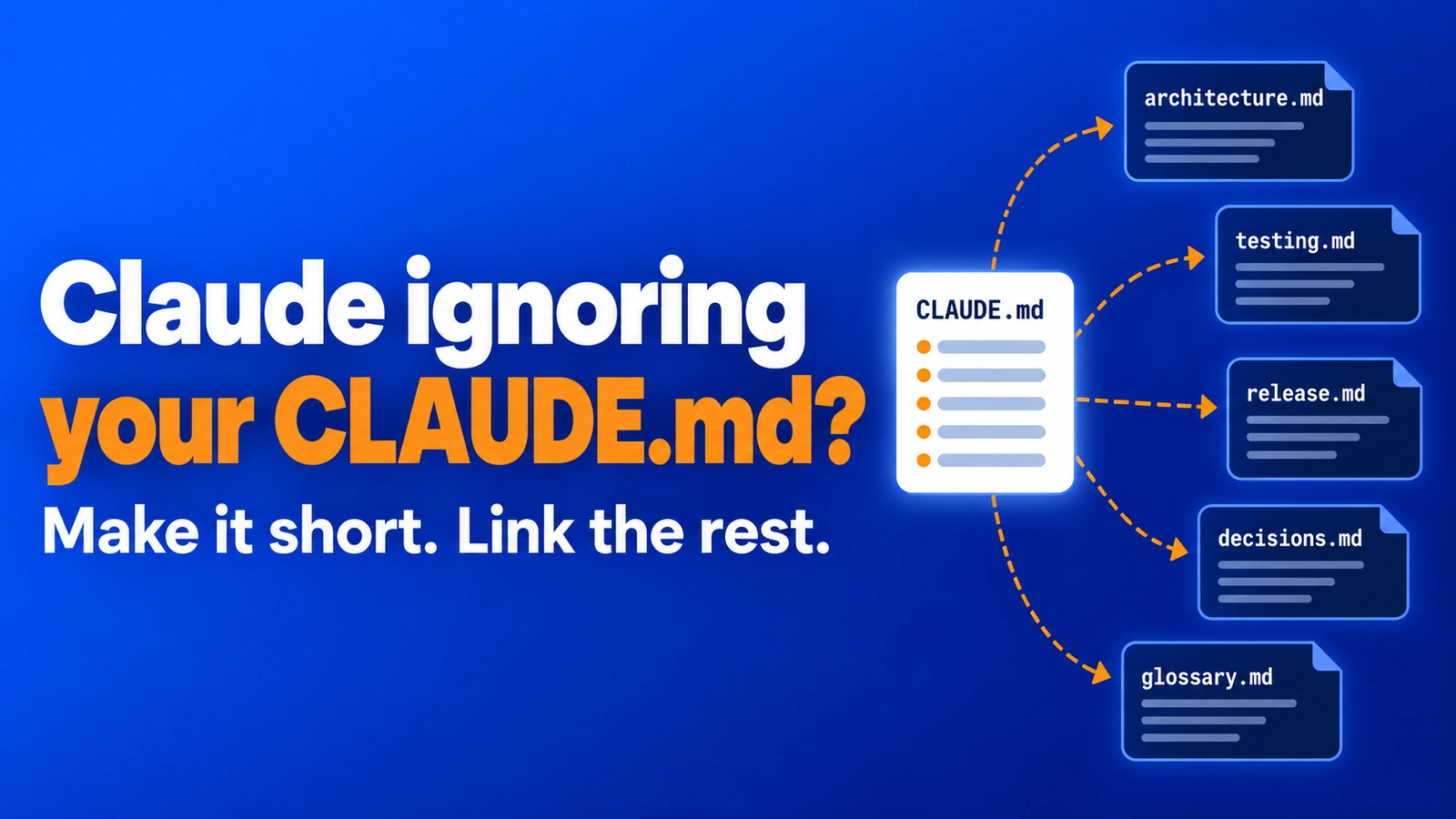
Most CLAUDE.md best practices fit in one sentence: keep the file short, and let it point to the docs that hold the detail. A CLAUDE.md file is the instruction file Claude Code reads at the start of every session. It is the closest thing the agent has to a memory of your project. And the most common mistake is treating it like a wiki.
We build and ship apps with Claude Code every day, and our repos hold hundreds of Markdown files: CLAUDE.md, SKILL.md, plans and specs. This guide is what we learned, checked against Anthropic's official docs as of October 2026. You will get where the file lives, how long it should be, what goes in it, a starter template, and a fix list for when Claude ignores it.
The short answer#
- Know what it is. CLAUDE.md is context, not configuration. Claude tries to follow it, but nothing enforces it. See what a CLAUDE.md file actually is.
- Put it in the right place. Project rules go in
./CLAUDE.md, personal ones in~/.claude/CLAUDE.md. See where CLAUDE.md files live and how they load. - Stay under about 200 lines. That is Anthropic's own target, not a hard limit. See how long a CLAUDE.md should be.
- Keep only what Claude can't guess, and link out for the rest. See what to put in CLAUDE.md and your docs folder is the AI's memory.
- When Claude ignores it, run
/contextfirst. See why Claude isn't following your CLAUDE.md.
What a CLAUDE.md file actually is#
A CLAUDE.md file is a plain Markdown file of instructions. Claude Code reads it at the start of every session, so you stop re-explaining the same things: build commands, conventions, project layout, "always do X" rules.
Two details from the official docs change how you should write it.
First, it is not the system prompt. The docs say CLAUDE.md content "is delivered as a user message after the system prompt." Claude reads it and tries to follow it, but there is no guarantee of strict compliance, especially for vague or conflicting rules.
Second, it is context, not enforced configuration. If something must happen every time, such as running a formatter after each edit or blocking writes to a folder, use a hook. Hooks run as shell commands at fixed points and do not depend on what Claude decides.
Add a line when Claude makes the same mistake twice, or when you type the same correction you typed last session.
Where CLAUDE.md files live and how they load#
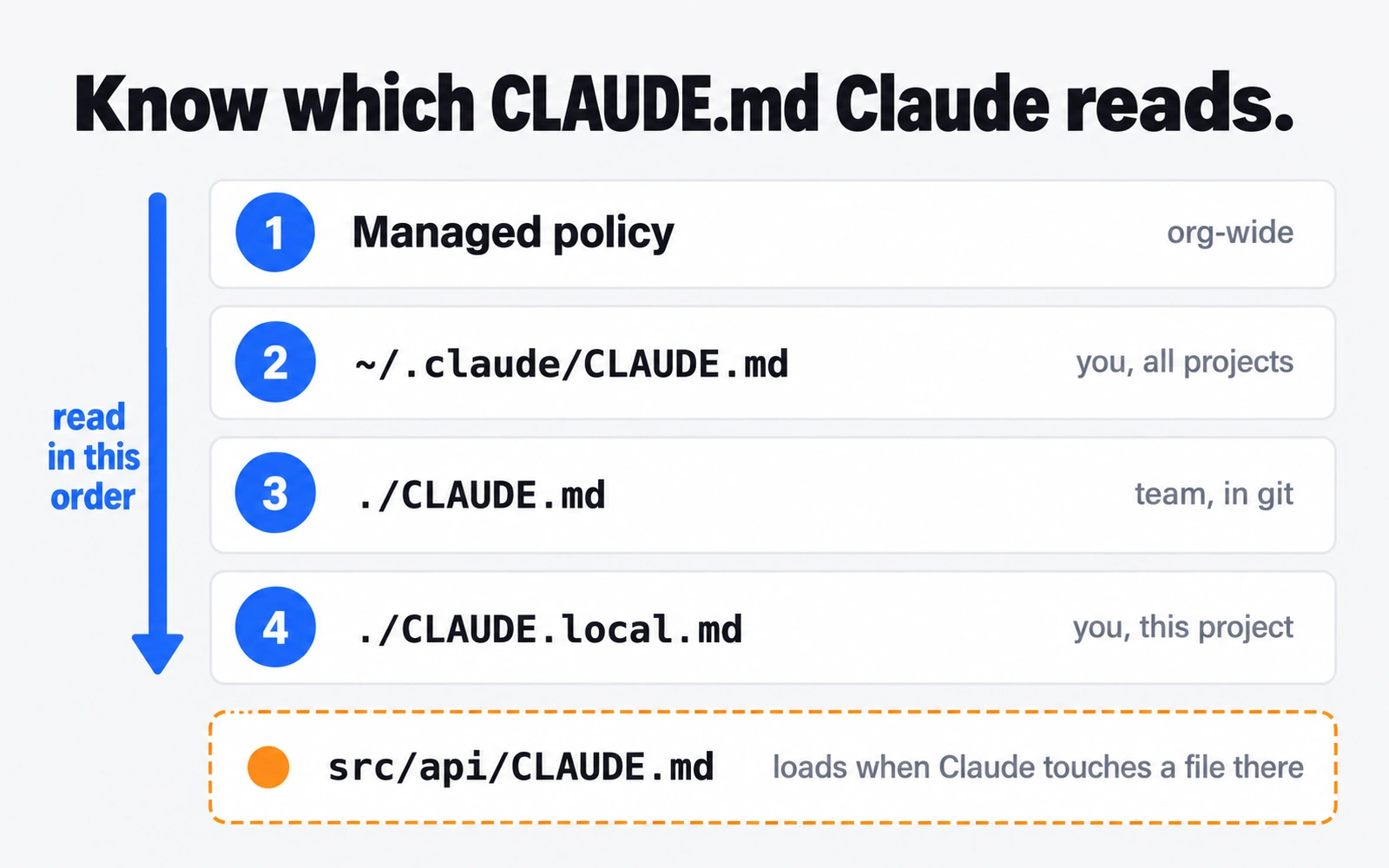
There are four places for a CLAUDE.md file. Claude Code reads them from broadest to most specific, so a project rule appears in context after a user rule.
| Scope | Location | Who it is for |
|---|---|---|
| Managed policy | macOS /Library/Application Support/ClaudeCode/CLAUDE.md, Linux and WSL /etc/claude-code/CLAUDE.md, Windows C:\Program Files\ClaudeCode\CLAUDE.md |
Everyone in an organization, set by IT |
| User | ~/.claude/CLAUDE.md |
You, in every project |
| Project | ./CLAUDE.md or ./.claude/CLAUDE.md |
Your team, committed to git |
| Local | ./CLAUDE.local.md |
You, in this project only (add it to .gitignore) |
A few loading rules trip people up:
- Files above your working folder load at launch. Start Claude in
foo/bar/and it reads bothfoo/CLAUDE.mdandfoo/bar/CLAUDE.md. - Nothing overrides anything. All files are joined together. Instructions closer to where you launched Claude are read last. Inside one folder,
CLAUDE.local.mdcomes afterCLAUDE.md. - Subfolder files load on demand. A
src/api/CLAUDE.mdloads only once Claude reads, writes or edits a file insrc/api/. - HTML comments are stripped. Block comments like
<!-- note for humans -->never reach Claude, so they cost no context.
What about AGENTS.md? Claude Code v2.1.277 and later reads AGENTS.md only when no CLAUDE.md or CLAUDE.local.md exists in your working folder or above it. Using several agents? The docs suggest a CLAUDE.md that starts with @AGENTS.md, with Claude-only rules below.
Larger projects can split rules into .claude/rules/*.md. A rule with a paths: field in its frontmatter loads only when Claude touches matching files.
How long should a CLAUDE.md be?#
This is the most searched question about the file ("claude.md max size", "how many lines"), and the official answer is clear.
- Target under 200 lines per file. The docs say longer files "consume more context and reduce adherence."
- There is no small hard cap. Claude Code loads a CLAUDE.md of up to 4 MiB in full and skips a larger one.
- You get a warning. When a file passes the recommended length, Claude Code warns at startup and in
/status. It also warns when many short files add up past a combined limit. - Imports do not make it smaller. Files pulled in with
@pathload at launch too, so they count against the same context.
The 200-line figure is about attention, not storage. Anthropic's best-practices page says bloated CLAUDE.md files cause Claude to ignore your actual instructions.
Don't confuse this with auto memory. The 200-line or 25KB load limit you may have read about applies to Claude's own MEMORY.md notes, not to your CLAUDE.md.
What to put in CLAUDE.md (and what to leave out)#
Anthropic's best-practices page gives a test for every line: "Would removing this cause Claude to make mistakes?" If not, cut it. Here is the include and exclude list from that page, in short form.
| Put in CLAUDE.md | Leave out |
|---|---|
| Bash commands Claude can't guess | Anything Claude can learn by reading the code |
| Code style rules that differ from defaults | Standard language conventions |
| How to run tests, and which runner | Detailed API docs (link to them instead) |
| Branch naming and PR conventions | Information that changes often |
| Architecture decisions specific to your project | Long explanations or tutorials |
| Environment quirks, such as required env vars | File-by-file tours of the codebase |
| Gotchas that aren't obvious | "Write clean code" and similar |
Write each rule so you could check it. The docs' examples: "Use 2-space indentation" instead of "Format code properly", and "API handlers live in src/api/handlers/" instead of "Keep files organized."
Use headers and bullets, not dense paragraphs. If Claude keeps skipping one rule, add "IMPORTANT" to that line alone; emphasize many lines and none stands out.
Your docs folder is the AI's memory#
Here is the part most CLAUDE.md guides get wrong. They tell you to move long material into other files "and import them with @." That keeps CLAUDE.md tidy to read, but the official docs say imported files still load at launch. Your context bill stays the same.
There are two ways to reference a file, and they behave differently:
@docs/file.md(an import). The file is expanded into context at launch, every session. Imports can nest up to four hops. Paths are relative to the file that holds the import.- A plain path, such as
docs/release.md, with no @. Nothing loads. Claude opens the file only if it decides it needs it. The docs make the same point aboutAGENTS.md: a sentence telling Claude to read it means Claude sees it "only if it decides to open the file."
That second behavior is a feature. It lets your docs folder act as long-term memory that costs nothing until a task needs it. The pattern we use:
- CLAUDE.md holds the rules that apply to every task, plus a short index of docs.
- Each index line says when to read the doc, not only where it is. "Before changing billing code, read
docs/billing.md" works far better than a bare list of files. - Use
@imports only for files Claude truly needs every session, like a sharedAGENTS.md. - Wrap example paths in backticks. The docs note that import parsing skips code spans, so
`@README`stays literal text.
The weak point: it only works while the links are true. Rename docs/billing.md and the index points at nothing, with no error. More on that below.
If you want the same idea applied to running out of context mid-session, read our guide on what to do when Claude Code's context is full. And if you are not sure where Claude Code keeps the plans it writes, see where Claude Code saves plan files.
A starter CLAUDE.md you can copy#
Run /init first. The docs say it analyzes your codebase and writes a starting file with build commands, test steps and conventions it finds, and if a CLAUDE.md already exists it suggests improvements instead of overwriting it. Then trim it toward something like this:
<Project name>: one line on what it is and who uses it.

## Commands
- Install: `<install command>`
- Run locally: `<run command>`
- Test one file: `<test command> path/to/file`
- Lint + typecheck before you say "done": `<lint command>`

## Rules
- <A rule Claude broke twice, written so you could check it>
- <A convention that differs from the language default>
- Never edit generated files in `<folder>/`; change `<source>` and regenerate.
- Ask before adding a new dependency.

## Gotchas
- <Environment quirk, e.g. a required env var or a port that is already taken>
- <Something that looks wrong but is intentional, and why>

## Docs index (read only when the task needs it)
- Before changing architecture or adding a module: `docs/architecture.md`
- Before writing or fixing tests: `docs/testing.md`
- Before a release or version bump: `docs/release.md`
- Why things are the way they are: `docs/decisions.md`

## When compacting
- Keep the list of files changed and the test commands used.
The docs paths sit in backticks with no @, so they load only on demand. The "When compacting" line follows Anthropic's suggestion to tell Claude what to keep when it summarizes a long session. If you can't write a project-specific line for a section, delete the section.
Personal habits that apply everywhere belong in ~/.claude/CLAUDE.md. Run /memory to open any of these files from inside a session.
Lessons from well-known CLAUDE.md examples#
Three public names come up whenever people search for the best CLAUDE.md. Here is what each primary source actually shows.
Boris Cherny (creator of Claude Code). In a January 2, 2026 thread on X, he wrote that the Claude Code team shares a single CLAUDE.md, checks it into git, and adds to it multiple times a week. The rule behind it: whenever Claude does something wrong, add a line so it doesn't happen again. He also tags Claude on coworkers' pull requests to update the file during review. The lesson is the habit: grow the file from real mistakes.
Andrej Karpathy. The viral "Karpathy CLAUDE.md" is not a file Karpathy wrote. It is a community repo that turned his January 26, 2026 post about LLM coding pitfalls into four general principles: think before coding, keep it simple, make surgical changes, and work toward checkable goals. Those make a good user-level file, since they apply to any project. Karpathy's own llm-council repo does have a CLAUDE.md. It is a detailed technical notes file, with module-by-module notes and gotchas such as which port the backend uses. That works for a small project. On a large one, the file-by-file part is exactly what Anthropic suggests leaving out.
Matt Pocock. His skills repo has a short CLAUDE.md (about 30 lines when we checked) that reads almost entirely as rules plus links: where skills go, what must stay in sync, and pointers to docs in an .agents/ folder for details. That is the "short file, point to docs" pattern in practice. Each pointer says when it matters, such as which guide to follow when you add or rename a skill.
Why Claude isn't following your CLAUDE.md#
Work through this list in order. It follows the troubleshooting section of the official docs.
- Check that it loaded. Run
/contextand look under Memory files. If your file isn't listed, Claude can't see it. - Check the location. A file in a sibling folder, or in a folder above a different project, won't load. See the table above.
- Remember subfolder files load late. A nested CLAUDE.md doesn't appear under Memory files at launch. It loads when Claude touches a file in that folder.
- Check for an AGENTS.md mix-up. If you rely on
AGENTS.md, anyCLAUDE.mdorCLAUDE.local.mdabove your working folder stops Claude from reading it by default. - Make the rule specific. "Use 2-space indentation" beats "format code nicely."
- Look for contradictions. If two files say different things, Claude may pick one arbitrarily. Run
/doctor prompt-audit(v2.1.283 or later) to have Claude find conflicting, outdated or broken references across your instruction files. It only proposes edits. - Check for built-in competition. If your file sets commit or PR rules, the docs suggest turning off the built-in ones with the
includeGitInstructionssetting. - Cut the file down. Over 200 lines, rules get lost.
/doctorproposes trims for content Claude can derive from the code. - Move must-run rules to hooks. If a step has to happen every time, a CLAUDE.md line is the wrong tool.
Lost after /compact? The project-root CLAUDE.md survives compaction: Claude re-reads it from disk. Instructions you only typed in chat do not. If a rule vanished after compacting, it was conversation-only, or it lives in a nested file or path-scoped rule that hasn't reloaded yet. Put it in CLAUDE.md.
Keep the links unbroken: orphans and dead links#
The "docs folder is memory" pattern has two failure modes, and both are silent.
- Dead links. CLAUDE.md points to a doc that was renamed or deleted. Claude loses that context without any error.
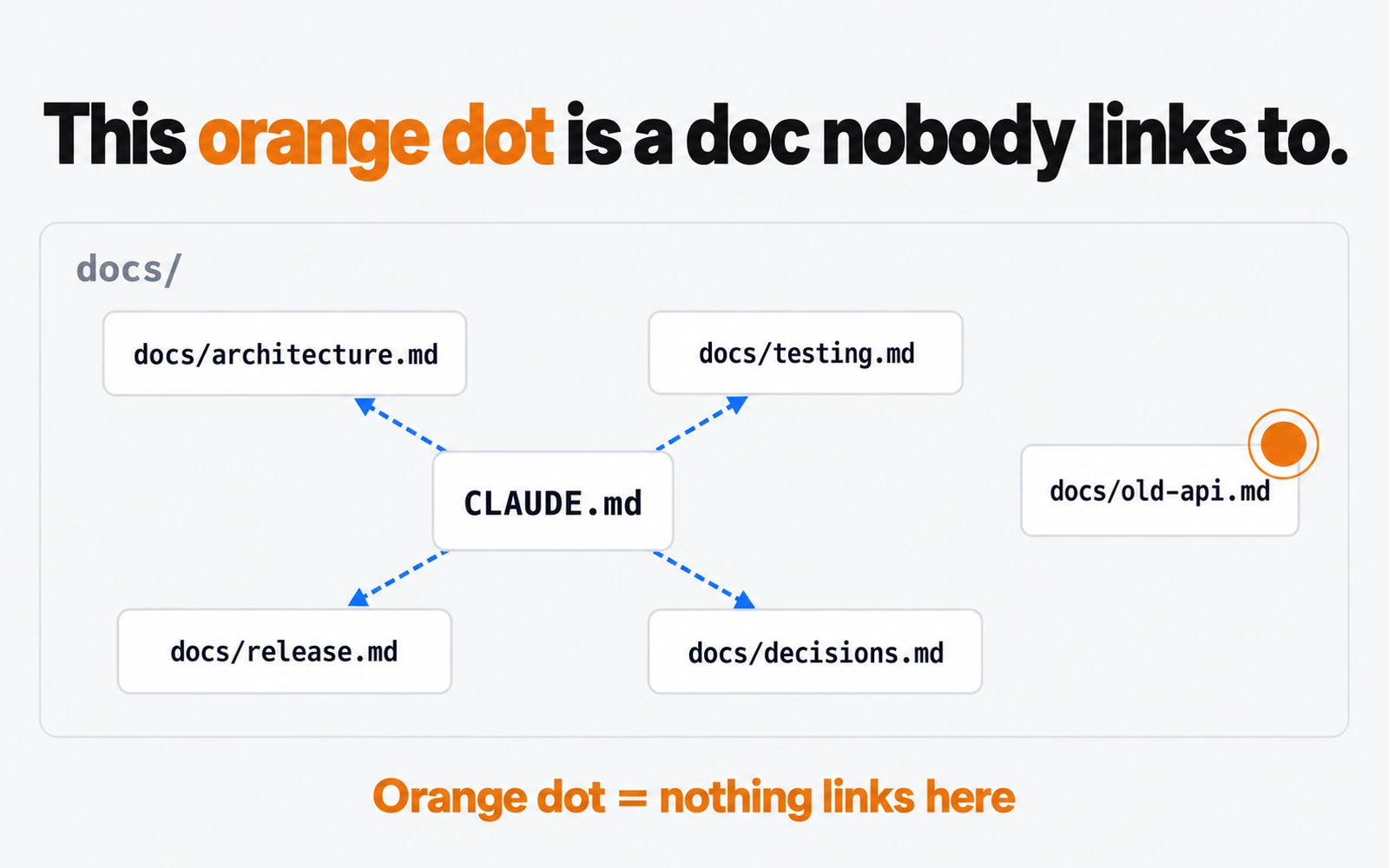
- Orphans. A doc exists, but nothing links to it. Claude will only find it by luck, and humans forget it is there.
For dead links, /doctor prompt-audit is the official route; the docs list references to files or commands that don't exist among the problems it looks for. Run it after any big rename.
Orphans are harder to see in a file tree. This is the problem that made us build Markdown Viewer, a free, read-only app for macOS and Windows. You add your project folder, and the Map view draws each Markdown file as a card grouped by folder, with dashed arrows for links. Any file nothing links to gets an orange dot. That is usually either a doc your CLAUDE.md index should mention, or a stale file you can archive.
You don't need an app for this; a weekly look at your docs folder does the job. The point is to look. For a wider comparison of tools, see our best Markdown viewer for Mac roundup, or read how to view the Markdown files Claude Code writes.
Our recommendation#
Start with /init, then cut. Keep CLAUDE.md under 200 lines of rules Claude can't guess, written so you could check them. Move everything else into a docs folder, link to each doc with a plain path and a note on when to read it, and save @ imports for the few files Claude needs every session. Add a line each time Claude repeats a mistake, the way the Claude Code team does. And check your links after every rename.
If you are new to Claude in general, our complete Claude guide covers plans and models. If you are still choosing a coding agent, Claude Code vs Codex explains how both read project instruction files.
Frequently asked questions
How many lines should a CLAUDE.md file be?
Anthropic's docs say to target under 200 lines per CLAUDE.md file, because longer files use more context and reduce adherence. That is guidance, not a hard cap. Claude Code loads a file of up to 4 MiB in full and skips anything larger, and it shows a warning at startup when a file goes over the recommended length.
Is CLAUDE.md a system prompt?
No. The official docs say CLAUDE.md content is delivered as a user message after the system prompt, not as part of it. Claude reads it and tries to follow it, but there is no guarantee of strict compliance. For rules that must always run, use a hook. For system-prompt-level text, use the --append-system-prompt flag.
Can CLAUDE.md reference other files?
Yes, in two ways. An @path import such as @docs/git-instructions.md expands that file into context at launch, up to four hops deep. A plain mention of a path, without the @, costs nothing until Claude decides to open the file. Use imports for rules needed every session and plain links for everything else.
Where do I put my CLAUDE.md file?
For a project, put it at ./CLAUDE.md or ./.claude/CLAUDE.md and commit it to git. Personal rules for every project go in ~/.claude/CLAUDE.md. Private notes for one project go in ./CLAUDE.local.md, which you add to .gitignore. Subfolders can have their own CLAUDE.md, which loads when Claude works in that folder.
Should I use CLAUDE.md or AGENTS.md?
Either works. Recent Claude Code versions (v2.1.277 and later) read AGENTS.md when no CLAUDE.md or CLAUDE.local.md exists in your working directory or above it. If you use several coding agents, keep shared rules in AGENTS.md and add a CLAUDE.md that starts with @AGENTS.md, then put Claude-only rules below it.
Why is Claude not reading my CLAUDE.md?
Run /context and look under Memory files. If the file is missing there, it is in a location that does not load for this session, or it sits in a subfolder and loads only when Claude touches a file there. If it is listed but ignored, the file is usually too long, too vague, or contradicts another instruction file.
Sources
- Claude Code docs — How Claude remembers your project (CLAUDE.md, imports, rules, auto memory)
- Claude Code docs — Best practices for Claude Code
- Boris Cherny on X — how the Claude Code team uses Claude Code (Jan 2, 2026, Thread Reader copy)
- Andrej Karpathy on X — observations on LLM coding pitfalls (Jan 26, 2026)
- andrej-karpathy-skills — community CLAUDE.md derived from Karpathy's post (GitHub)
- karpathy/llm-council — CLAUDE.md (GitHub)
- mattpocock/skills — CLAUDE.md (GitHub)
Related reading

AI Tools & Models
Claude Code Context Full? What to Do Before Auto-Compact Eats Your Decisions
Claude Code context full? Learn what auto-compact keeps and drops, when to use /compact vs /clear, and how Markdown files keep your decisions safe.

AI Tools & Models
Claude Code Plan File Location: Where Plans Are Saved and How to Move Them
The Claude Code plan file location is ~/.claude/plans by default. See how plan files are named, how plansDirectory moves them, and how to review them.
AI Tools & Models
What Is Claude Fable? Anthropic's Top Model Explained (Fable 5.1)
What is Claude Fable? A plain guide to Fable 5.1: how it relates to Mythos, what it costs, how it compares with Opus 5.5, and when it is worth using.